Last updated: October 20, 2026. Shopify limits are linked to Shopify’s documentation. Disclosure: Webiots develops Ultimate Product Options, the app used in the setup steps.
Quick answer: A product with 5 or more choices can’t be built from Shopify variants alone, because each product allows only 3 options. Keep the choices you stock (like leather color) as variants, and add made-to-order choices (hardware, lining, monogram) as product options. You get thousands of combinations on one product page with only a few SKUs to track.
Key takeaways:
- The 3-option cap blocks you before the 2,048-variant limit.
- Track stock only on what’s physically on the shelf.
- Check every choice reaches the order and your fulfillment team.
In this guide
- Worked example: a custom leather tote
- What goes wrong with variants only
- The two-tier setup: base SKUs + options
- Variants only vs two-tier comparison
- How to set it up step by step
- Fulfillment and order data
- The bottom line
- FAQ
How Many Combinations Can One Customizable Product Have?
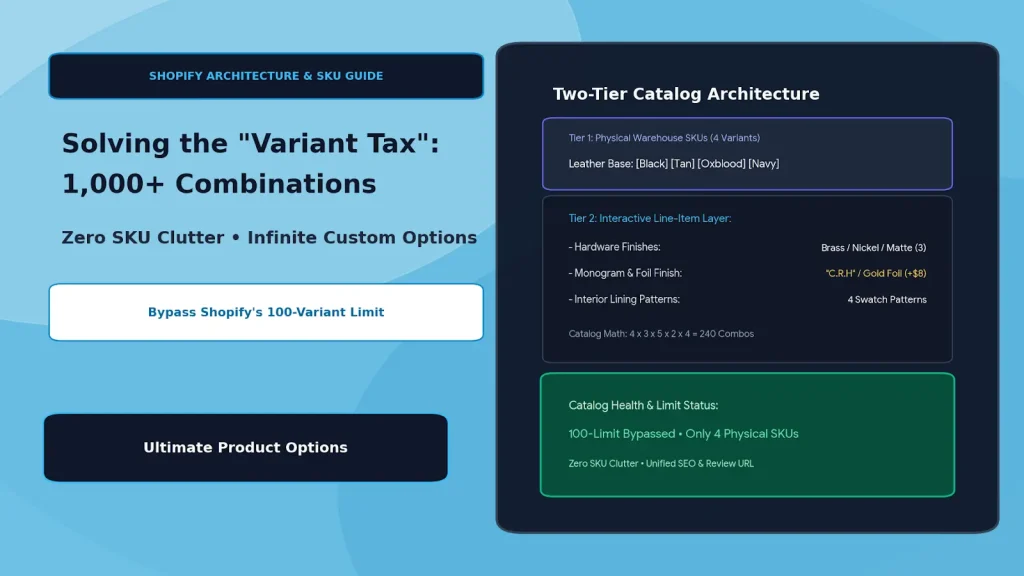
Far more than most merchants expect, because every choice multiplies the total. Take a custom leather tote bag with 5 choices:
| Choice | Values | Count |
|---|---|---|
| Leather color | Black, Tan, Oxblood, Navy | 4 |
| Hardware finish | Brass, Nickel, Matte Black | 3 |
| Monogram foil | Gold, Silver, Rose Gold, Blind Deboss, White | 5 |
| Strap length | Standard, Extended | 2 |
| Interior lining | 4 patterns | 4 |
| Total combinations | 4 × 3 × 5 × 2 × 4 | 480 |
Add a monogram text field for the customer’s initials and the possible combinations become effectively unlimited. Yet the bag you actually stock comes in only 4 versions: the 4 leather colors.
What Goes Wrong When You Use Variants Only?
This tote has 5 choices, and Shopify allows only 3 options per product, so it can’t be built from variants at all. Each product can have up to 3 options and 2,048 variants (Shopify Help Center). Merchants who try to force it into variants usually pay a “variant tax”:
- Split listings: one product becomes “Tote – Brass Hardware” and “Tote – Nickel Hardware”, which spreads reviews across pages and makes shoppers click around to compare.
- Phantom SKUs: even with 3 options, 4 × 3 × 5 = 60 variants means 60 SKUs to track for a bag that exists in 4 versions.
- Slow changes: adding one seasonal foil color means creating and pricing a new variant for every existing combination.
- Long pickers: shoppers scroll through long dropdowns of combinations instead of making a few simple choices.
- Compatibility limits: Shopify notes some themes, apps and sales channels don’t support more than 100 variants per product.
What Is the Two-Tier Setup?
Tier 1 is the physical base product, tracked as variants. Tier 2 is every made-to-order choice, captured as product options and saved to the order as line item properties.
| Tier | What it holds | Tote example | Stock tracked? |
|---|---|---|---|
| 1. Base SKUs | Shopify variants for what’s physically on the shelf | 4 leather colors | Yes |
| 2. Option layer | App options for made-to-order choices and add-ons | Hardware, foil, strap, lining, monogram text, +$8 monogram fee | No (made to order) |
| Result | One product page | 480+ combinations | 4 SKUs |
When strap length is something you stock separately, keep it as a second variant option instead. The rule is simple: if you count it on a shelf, it’s a variant; if you make it to order, it’s an option. For more on this split, see virtual options vs native variants.
Variants Only vs Two-Tier: Comparison
| Variants only | Two-tier (variants + options) | |
|---|---|---|
| Choices per product | 3 options max | 3 variant options + unlimited app options |
| SKUs for the tote | Up to 60 (and only 3 of the 5 choices) | 4 |
| Custom text and file uploads | Not possible | Yes |
| Extra charges | Fixed price per variant | Add-on price per choice |
| Show or hide choices | No | Yes, with conditional logic |
| Product pages | Often split into several | One page |
How to Set Up 1,000+ Combinations Step by Step
Create the base product with stock-tracked variants, then add the rest as an option set. Webiots develops Ultimate Product Options; here is the setup for the tote.
- Install Ultimate Product Options and turn on its app embed in the theme editor.
- Create the base product in Shopify admin with one option, Leather Color (Black, Tan, Oxblood, Navy). Set prices and turn on inventory tracking for these 4 variants.
- Create an option set in the app and assign it to the tote, or to a collection of similar bags.
- Add the choices: image swatches for hardware finish and lining pattern, a dropdown for strap length, and a checkbox “Add monogram (+$8)”.
- Add conditional logic (Basic plan and above): show the monogram text field and foil swatches only when “Add monogram” is ticked. Keep the text field short, such as 3 characters for initials.
- Test the full journey: pick a combination, add to cart and place a test order. Check that the leather color variant’s stock goes down by one and every other choice, plus the $8 fee, appears on the order line.
For pricing choices like the monogram fee, see how to charge extra for product options, and for text fields, how to add a custom text field.
Build 1,000+ combinations on one product page
Swatches, dropdowns, text fields, add-on prices and conditional logic, with only your real stock as variants. Free plan available.
How Do Choices Reach Fulfillment?
Every option is saved on the order as a line item property, so your team sees exactly what to make. Shopify stores these with each line in the order (Shopify Dev Docs). Plan for three things:
- Picking: staff pick the base bag by its variant SKU, then read the order’s properties for hardware, lining and monogram.
- Packing slips: check that your packing slip template shows line item properties. If it doesn’t, edit the template or use an order printing app.
- 3PL and ERP tools: line item properties are included in Shopify’s order data, but each tool maps them differently. Send a test order through your 3PL or ERP and confirm the custom details arrive. See how to structure line item properties for 3PL and ERP sync.
The Bottom Line
The “variant tax” comes from treating made-to-order choices as stock. Keep variants for what sits on your shelf, add every other choice as a product option, and check that each choice reaches the order, the packing slip and your fulfillment tools before you scale it across your catalog.
Want to try it on one product? Install Ultimate Product Options free or learn more about the app.
Frequently Asked Questions
How many combinations can a Shopify product have?
With variants alone, up to 2,048 variants from 3 options. With product options added through an app, there’s no practical limit, because options don’t create variants.
Does using product options affect inventory tracking?
No. Stock stays on the native variants you keep, such as leather color. Made-to-order choices don’t need their own stock.
Can I charge extra for options without creating variants?
Yes. Product options apps add a price to any choice, such as +$8 for a monogram, without creating new variants.
Will my warehouse team see every choice?
Yes, on the order in Shopify admin. Check that your packing slips and any 3PL or ERP tool also show line item properties by sending a test order.
What is the “variant tax”?
It’s the extra work caused by turning every customization into a variant: more SKUs, split product pages, slower catalog changes and longer pickers for shoppers.
Related Reading
- Virtual Options vs Native Variants: Prevent Shopify SKU Inflation
- How to Add More Than 3 Options to a Shopify Product
- How to Charge Extra for Product Options on Shopify
- Clean 3PL & ERP Order Sync
Update Log
October 20, 2026: Updated for Shopify’s current limits (3 options, 2,048 variants), corrected the combination math (480, not 240), and added a quick answer, comparison tables, fulfillment checks and FAQ.