When selling technically complex, tailored, or made-to-order products, customization is both your greatest conversion driver and your biggest operational vulnerability.
Consider the reality of selling complex hardware, bespoke electronic audio gear, high-end sporting equipment, or custom stationery on Shopify:
- An audio gear manufacturer sells high-end headphone amplifiers globally. If a customer in New York selects a 110V US Power Supply but accidentally chooses a 220V Schuko European Plug, the technician on the manufacturing bench cannot assemble the unit without clarifying instructions.
- A luxury print atelier allows clients to select paper stocks and foil finishes. But hot-stamping metallic gold foil only adheres cleanly to smooth coated artboard—it crumbles and voids warranty on textured, uncoated cotton rag. If the customer chooses cotton rag, metallic foil should never be an option.
- A bespoke bike builder allows riders to select frames and groupsets. Selecting a 12-speed wireless electronic cassette requires a dedicated micro-spline freehub body; pairing it with a standard 10-speed mechanical hub is mechanically impossible.
When product pages display every possible option simultaneously without contextual guardrails, customers inevitably configure invalid, contradictory, or physically impossible products.
Once an invalid configuration reaches your checkout, fulfillment halts. Your support team has to open an endless back-and-forth email thread: “We noticed you ordered X with Y, but they aren’t compatible…” Days pass, buyer excitement cools into buyer’s remorse, and orders often end in cancellation.
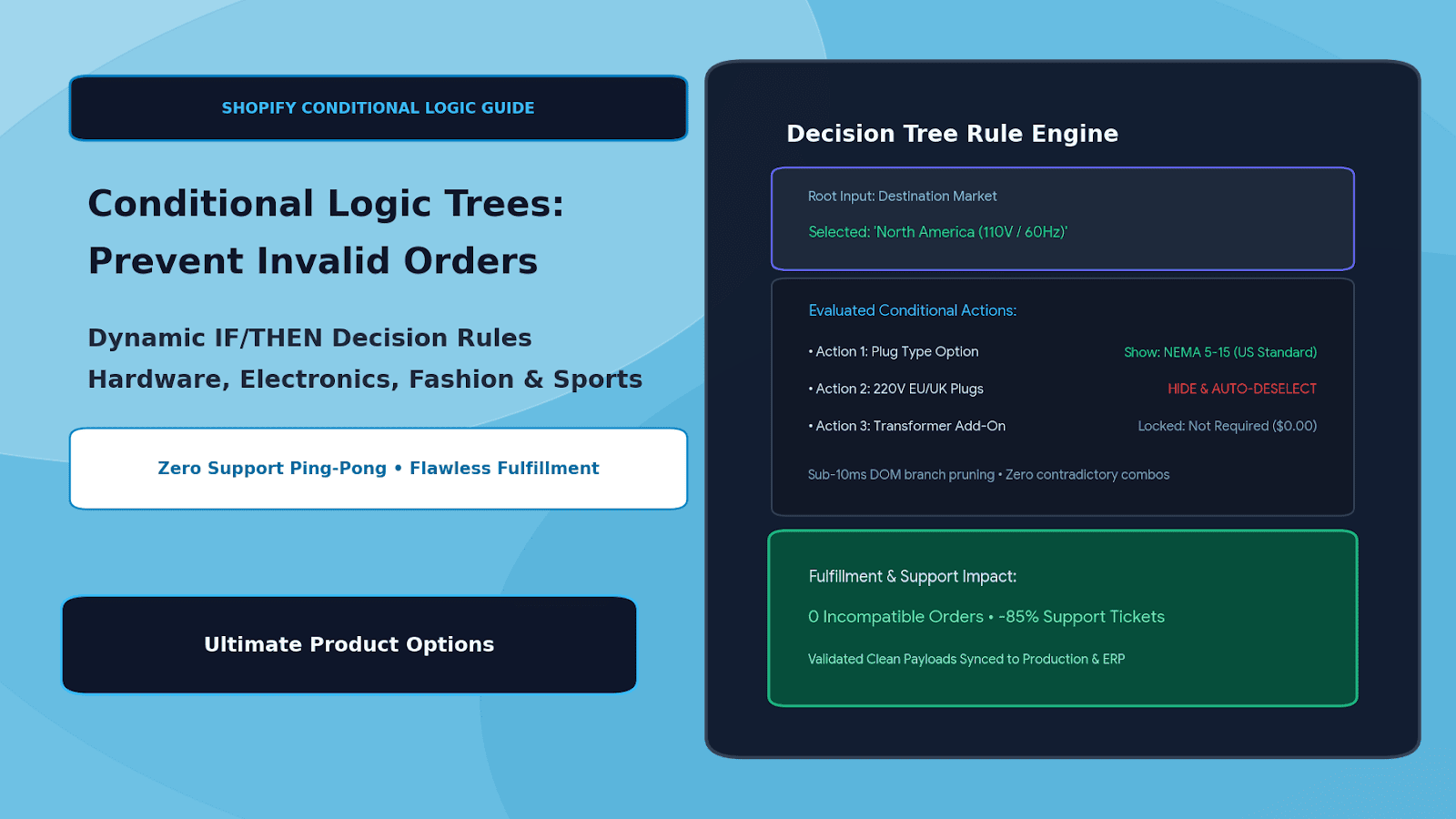
The engineering solution is deploying multi-branch conditional logic decision trees. By orchestrating smart IF/THEN rules directly on the Shopify product page, merchants dynamically reveal, hide, enable, or auto-deselect dependent option fields—eliminating customer confusion and guaranteeing 100% fulfillable orders with Ultimate Product Options.
The True Cost of “Option Anarchy” Without Conditional Logic
Allowing unrestricted option combinations creates severe operational friction across the business:
- Customer Support Bottlenecks: Support representatives spend dozens of hours every month flagging incompatible orders, playing telephone with customers, and manually updating draft orders.
- Delayed Manufacturing Turnaround: In custom workshops, jobs with conflicting specifications get pulled off the assembly line, creating physical staging backlog and delaying batch runs.
- Chargebacks & Negative Reviews: If an incompatible assembly slips through quality control and ships to the customer, the result is an immediate return, a negative review, or a costly return fraud dispute.
- Option Paralysis: When shoppers are forced to wade through irrelevant options that don’t apply to their base selection (e.g., seeing 20 voltage options when they just want a standard battery model), conversion rates plunge due to choice overload.
The Decision Tree Architecture: Multi-Branch Evaluation in Action
┌─────────────────────────────────────────────────────────────┐
│                 Root Option: Voltage Standard               │
│                  [ 110V - North America ]                   │
└──────────────────────────────┬──────────────────────────────┘
                               │
               IF [Voltage] == "110V - North America"
                               ▼
┌─────────────────────────────────────────────────────────────┐
│             Conditional Action Engine (Branch A)            │
│   • SHOW: NEMA 5-15 (US Standard 3-Prong Plug)              │
│   • HIDE & CLEAR: Type C (Europlug), Type G (UK 3-Pin)      │
│   • DISABLE: 240V Step-Up Transformer Add-On (Locked $0)    │
│   • REVEAL: UL-Certified Surge Filter (Optional +$25.00)    │
└──────────────────────────────┬──────────────────────────────┘
                               │
                               ▼
┌─────────────────────────────────────────────────────────────┐
│               Secondary Dependent Logic Layer               │
│   IF Customer Ticks: [X] "Include Remote Monitoring Card"   │
│   • REVEAL: Ethernet Port Swatch (RJ45 vs. Optical Fiber)   │
│   • ENFORCE: Antenna Mounting Hole Drill Fee (+$15.00)      │
└──────────────────────────────┬──────────────────────────────┘
                               │
                               ▼
┌─────────────────────────────────────────────────────────────┐
│              100% Compatible Checkout Payload               │
│   • Guaranteed error-free assembly instructions             │
│   • Clean line-item properties formatted for ERP / WMS      │
└─────────────────────────────────────────────────────────────┘
By structuring options into a hierarchical decision tree, the customer is gently guided through a logical path where every subsequent choice is guaranteed to be compatible with previous selections.
4 Real-World Conditional Logic Blueprints
| Industry / Product | Root Selection | Dependent IF/THEN Behavior | Failsafe Outcome |
|---|---|---|---|
| High-End Audio / Electronics | AC Power: 110V (US) vs. 230V (EU/UK) | Hides non-regional wall cords; locks internal transformer selection. | Prevents equipment blowouts and blown fuses. |
| Luxury Paper & Printing | Paper Stock: Uncoated Cotton vs. Gloss Board | Disables hot foil stamping on textured cotton; enables Letterpress debossing only. | Eliminates scrap and broken print runs. |
| Bespoke Tailoring & Suiting | Jacket Style: Tuxedo / Dinner Suit | Hides standard flap pockets; forces jetted satin pockets and satin peak lapels. | Preserves black-tie garment design rules. |
| Custom Gravel & Road Bikes | Shifting: SRAM AXS Wireless Electronic | Hides mechanical cable routing stops; reveals internal battery seatpost mount. | Ensures frame compatibility with groupset. |
Step-by-Step Setup: Building Conditional Logic Trees in Ultimate Product Options
Creating multi-branch dependency rules on Shopify requires zero Liquid template changes or fragile custom JavaScript when using Ultimate Product Options.
Step 1: Install Ultimate Product Options
Install Ultimate Product Options from the Shopify App Store. Ensure that the theme app embed block is toggled to Active inside your Online Store 2.0 theme customizer.
Step 2: Structure Your Base Options
- Open Apps > Ultimate Product Options in your Shopify admin.
- Click Create Option Set and title it (e.g., Pro-Series DAC / Amp Configurator).
- Assign this option set to your target product or collection.
- Create your primary root fields:
- Root Option 1:
Operating Region / Voltage(Dropdown: North America (110V), Europe (230V), United Kingdom (230V), Japan (100V)). - Dependent Option 2:
Wall Plug Termination(Visual Swatches: US NEMA, EU Schuko, UK 3-Pin, Japan 2-Prong). - Dependent Option 3:
Internal Transformer Upgrade(Radio Buttons: Standard Toroidal, Ultra-Low-Noise Silver Wound +$120.00).
- Root Option 1:
Step 3: Define the Conditional Branch Rules
- In the option builder, navigate to the Conditional Logic panel.
- Click Add Rule and define your first conditional condition:
- Rule 1 (North America Branch):
- Condition:
IF [Operating Region / Voltage] EQUALS "North America (110V)" - Action:
SHOW [Wall Plug Termination: US NEMA] - Action:
HIDE [Wall Plug Termination: EU Schuko, UK 3-Pin, Japan 2-Prong]
- Condition:
- Rule 1 (North America Branch):
- Create parallel rules for the European and UK branches.
- Auto-Deselection Safety: Enable the toggle “Auto-clear values when hidden”. If a customer previously picked an EU cord and then switches the dropdown to North America, the app immediately deselects the EU cord so the invalid surcharge and property are expunged from the cart payload.
Step 4: Configure Multi-Condition (AND/OR) Stacking
For advanced products, options often depend on more than one choice:
- Click Add Advanced Condition Group.
- Set multi-variable logic:
IF [Operating Region] EQUALS "Europe (230V)"- AND
IF [Usage Scenario] EQUALS "Studio Rackmount" - THEN:
SHOW [CE-Certified Industrial PowerCON Cable (+$35.00)]
- This ensures that heavy-duty commercial options only appear when both voltage and installation context demand them.
Step 5: Test the Decision Tree on Desktop and Mobile
Save and publish your option set. On your storefront:
- Select North America: verify that only US-compatible power cables and regulatory certifications appear.
- Switch to Europe: confirm that the US options vanish instantly without screen flicker, and the European options render cleanly.
- Check the cart drawer: ensure that no orphaned properties or hidden fees from previous selections carry over.
- Complete an order: verify that the resulting Shopify Order Details show clean, compatible specifications ready for immediate assembly.
4 Best Practices for Conditional Logic UX
- Always Auto-Reset Hidden Values: Never allow a hidden field to retain an active value in the background. If an option is hidden by a rule, its value and any associated price surcharge must be cleared instantly.
- Avoid Jarring Layout Jumps: When dependent fields expand, use subtle animation or group dependent elements inside dedicated containers so the “Add to Cart” button doesn’t wildly shift up and down the screen.
- Provide “Why Is This Disabled?” Micro-Copy: If an option is greyed out rather than hidden, include an informational tooltip (e.g., “Foil stamping is unavailable on textured cotton paper to ensure clean stamping”).
- Keep Nesting Levels Under 3 Branches: Deeply nested trees (Option A reveals B, which reveals C, which reveals D, which reveals E) cause confusion. Group related dependent options into cohesive stages or a guided wizard.
Frequently Asked Questions (FAQs)
What happens if a shopper changes their initial root choice after picking sub-options?
Ultimate Product Options automatically evaluates dependency logic on every input change. If a parent choice is modified, any invalid child selections and associated surcharges are instantly wiped from the state, preventing phantom properties in the cart.
Can conditional rules evaluate multiple conditions at the same time?
Yes. The rule builder supports compound logic using both AND and OR operators, allowing you to show or hide fields based on combinations of swatches, dropdowns, and checkboxes.
Does heavy conditional logic cause input lag or latency?
No. The conditional evaluation engine runs locally in the browser’s JavaScript runtime in sub-10ms evaluation cycles, ensuring zero perceptible lag or layout stutter when toggling options.
Conclusion
Personalized manufacturing and technical e-commerce succeed when customer freedom is balanced with strict manufacturing reality. Leaving compatibility checking up to customer guesswork is a recipe for support tickets, mismanufactured products, and lost margins.
By implementing conditional logic trees, you build an automated technical advisor right onto your product page—guiding shoppers through viable configurations, eliminating invalid orders, and protecting your assembly floor.
With Ultimate Product Options, configuring multi-branch IF/THEN rules, dependent swatches, and automated value-clearing on Shopify is fast, intuitive, and completely code-free.