Last updated: October 20, 2026. Shopify features are linked to Shopify's documentation. Disclosure: Webiots develops Ultimate Product Options, the app used in the setup steps.
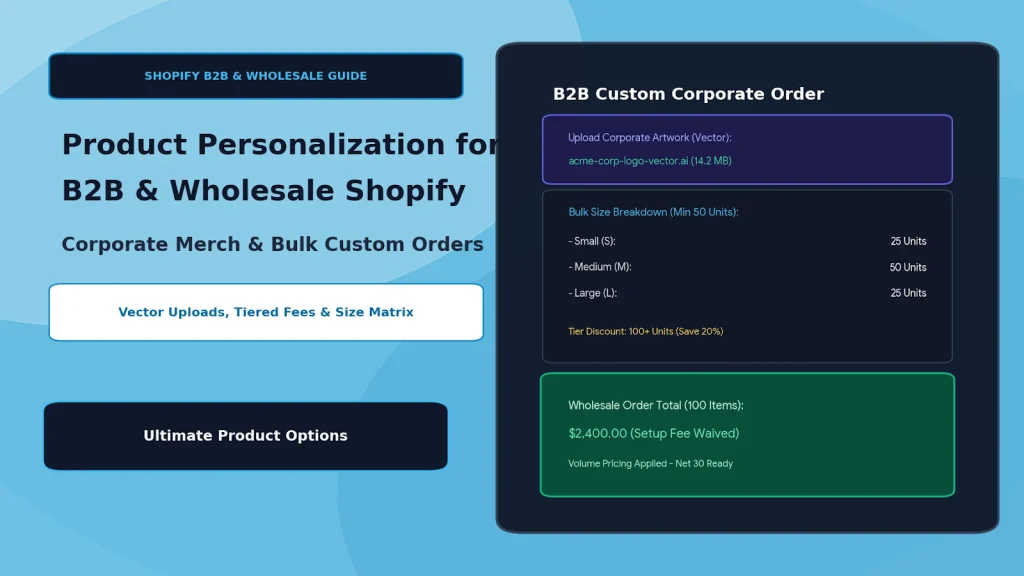
Quick answer: B2B personalization means letting business buyers configure bulk custom orders, such as branded apparel with a logo, print placement and size breakdown, on your Shopify store instead of over email. Use Shopify's B2B features for company accounts and pricing, and a product options app for artwork uploads, placement choices, setup fees and wholesale-only fields.
Key takeaways:
- B2B orders need artwork, placement and size breakdowns, not just one variant.
- Shopify B2B handles company accounts and pricing; options apps handle customization.
- Test a full bulk order before inviting wholesale buyers.
In this guide
- DTC vs B2B personalization
- Where native Shopify falls short
- 4 parts of a B2B configurator
- How to set it up
- Setup fees and volume pricing
- Fulfillment for corporate orders
- The bottom line
- FAQ
How Is B2B Personalization Different From DTC?
A retail shopper personalizes one item; a business buyer configures a bulk order with artwork, placement and a size breakdown. For example, a company ordering 500 embroidered jackets needs to upload its logo, choose a print position and split the order into 50 Small, 200 Medium, 200 Large and 50 XL.
| Requirement | DTC (retail) | B2B (wholesale) |
|---|---|---|
| Order size | A few units | Dozens to thousands of units |
| Artwork | Phone photos (JPG, PNG) | Vector logos (AI, EPS, SVG, PDF) |
| Sizes | One size per item | A breakdown across many sizes |
| Fees | Per-item personalization fee | One-time setup or digitizing fee plus per-unit decoration |
| Payment | Card at checkout | Often purchase orders or payment terms |
Where Does Native Shopify Fall Short for B2B Customization?
Shopify handles B2B accounts and pricing, but not the custom details of each order. Shopify B2B is available on the Basic, Grow, Advanced and Shopify Plus plans, and lets you set up companies with their own pricing, products and payment methods; the exact features depend on your plan (Shopify Help Center). What it doesn't add is a way to collect order-specific customization:
- The 3-option limit: each product allows only 3 options (Shopify Help Center). Garment color, size, print position and decoration type already make 4.
- No artwork upload field: product pages have no built-in place for a buyer to upload a logo.
- No per-order setup fees: there's no native way to add a one-time digitizing or tooling fee to a product.
Keep stock-tracked choices like garment color and size as variants, and add the rest as product options. See how to add more than 3 options to a Shopify product.
What Are the 4 Parts of a B2B Product Configurator?
Artwork upload, placement choices, fees, and wholesale-only visibility.
1. Artwork Uploads
Let buyers upload their logo on the product page instead of emailing it. Tell them which formats you need, such as vector AI, EPS, SVG or PDF for embroidery and screen printing. Ultimate Product Options supports uploads of up to 20 MB on Basic, 50 MB on Advanced and 100 MB on Premium; check that your chosen app accepts the formats you need. See how to let customers upload files.
2. Placement and Decoration Choices
Offer print or embroidery positions as swatches or radio buttons: left chest, center chest, full back (+$2.50). Use conditional logic to show thread color or print colors only after a decoration type is chosen.
3. Setup Fees and Add-On Prices
Add a one-time digitizing or tooling fee as a paid option, and per-unit decoration charges as add-on prices. See how to charge extra for product options.
4. Wholesale-Only Fields
Show B2B fields, such as Pantone color codes, carton labeling or a tax exemption upload, only to wholesale customers. Ultimate Product Options includes customer and country targeting on its Advanced plan. For detailed visibility rules, see the B2B wholesale blueprint for tiered customization rules.
How to Set Up a B2B Customizer With Ultimate Product Options
Create a B2B option set with artwork, placement and fees, target it at wholesale customers, then test a bulk order. Webiots develops Ultimate Product Options; here is the workflow for custom apparel.
- Install Ultimate Product Options and turn on its app embed in the theme editor.
- Set up the product with stock-tracked variants only, such as garment color and size.
- Create an option set called "Corporate Apparel" with a file upload for the logo, a placement choice and a decoration type.
- Add prices: per-unit decoration charges and a one-time setup fee.
- Add conditional logic (Basic plan and above) so follow-up fields appear only when relevant, such as thread colors after "Embroidery" is chosen.
- Target wholesale buyers (Advanced plan) so B2B fields appear only for tagged customers or chosen countries.
- Test as both buyer types: log in as a wholesale test customer and as a guest, then place a test order and check the logo file, placement and fees on the order.
Shopify's product form adds one variant at a time, so for a size breakdown either let buyers add each size to the cart, or collect the breakdown in a text or quantity field and confirm it on a draft order.
Build a B2B product configurator without code
Artwork uploads, placement choices, setup fees, conditional logic and customer targeting. Free plan available.
How Should You Structure Setup Fees and Volume Pricing?
Charge a one-time setup fee for small runs and lower per-unit prices as quantity grows. Illustrative example for embroidered polos; use your own costs:
| Order volume | Garment price | Decoration fee | One-time setup fee |
|---|---|---|---|
| 50–99 units | $28.00 each | +$3.50 per unit | $45 |
| 100–499 units | $24.00 each | +$2.50 per unit | Waived |
| 500+ units | $20.00 each | +$1.50 per unit | Waived |
Garment price breaks are usually handled by Shopify B2B price lists or a volume discount app. Decoration and setup fees can be add-on prices in your options app. Test how both work together in the cart before launch.
How Do You Fulfill Custom Corporate Orders Accurately?
Every customization is saved on the order as a line item property, so production sees exactly what to make.
- Artwork: download the logo from the link saved on the order, and check it before production.
- Proofs: send a digital proof for large runs and get approval before production starts.
- Packing slips: check your packing slip template shows line item properties, such as placement and size breakdown.
- 3PL and ERP tools: send a test order through your fulfillment tools and confirm the custom details arrive. See how to structure line item properties for 3PL and ERP sync.
The Bottom Line
B2B customization works best when each tool does its own job: Shopify B2B for company accounts and pricing, variants for stocked colors and sizes, and a product options app for artwork, placement, fees and wholesale-only fields. Test a full bulk order, from upload to packing slip, before inviting buyers.
Want to try it on one product? Install Ultimate Product Options free or learn more about the app.
Frequently Asked Questions
Does Shopify support B2B?
Yes. Shopify B2B is available on the Basic, Grow, Advanced and Shopify Plus plans, with features that depend on your plan. It covers company accounts and pricing; customization fields need an options app.
Can I hide wholesale options from retail buyers?
Yes. Options apps with customer targeting can show B2B fields only to tagged wholesale customers. In Ultimate Product Options this is on the Advanced plan.
Can business buyers upload large logo files?
Yes, with an options app. Ultimate Product Options allows 20 MB on Basic, 50 MB on Advanced and 100 MB on Premium. Confirm the file types your app accepts.
How do I charge a one-time setup fee?
Add the fee as a paid option, such as a "Digitizing setup (+$45)" checkbox, in a product options app. Decide whether it applies once per order or per product and test it in the cart.
Do I need Shopify Plus for B2B customization?
No. Shopify B2B is available on Basic and above, and options apps work on any plan. Some advanced checkout features are limited to Plus.
Related Reading
- The B2B Wholesale Blueprint: Country & Customer-Tiered Customization Rules
- How to Let Customers Upload a File or Photo on Your Shopify Product Page
- How to Charge Extra for Product Options on Shopify
- How to Manage 1,000+ Product Combinations Without SKU Clutter
Update Log
October 20, 2026: Updated for Shopify's current limits (3 options, 2,048 variants) and B2B plan availability, removed unverified app claims, and added a quick answer, setup steps, fulfillment checks and FAQ.