Last updated: October 27, 2026. Disclosure: Webiots develops Ultimate Product Options, the app used in the setup steps.
Quick answer: Learn how to create a custom product selector with dynamic pricing on Shopify by pairing customizable options with automated price adjustments instead of rigid multipacks. While standard bundles package separate SKUs together, an options-based configurator calculates on-page price surcharges live and attaches personalized inputs straight to a single order line item.
Key takeaways:
- Product options let shoppers customize made-to-order features without creating new SKUs.
- Bundles group separate catalog products, while custom selectors configure one modular product.
- Dynamic price modifiers update the product page subtotal instantly as buyers pick add-ons.
Merchants frequently ask how to create a custom product selector with dynamic pricing to offer personalized kits, bespoke goods, and flexible gift sets. Choosing between fixed product bundles and modular option configurators shapes your customer shopping experience, catalog structure, and fulfillment workflows.
In this guide:
- What is the difference between product options and product bundles on Shopify?
- When should you choose a custom option selector over a bundle app?
- How does dynamic pricing calculate option surcharges in real time?
- How do you manage inventory across customizable product selectors?
- How can you set up a custom product selector with dynamic pricing in Shopify?
- The Bottom Line
- Frequently Asked Questions
- Related Reading
- Update Log
- Sources
What is the difference between product options and product bundles on Shopify?
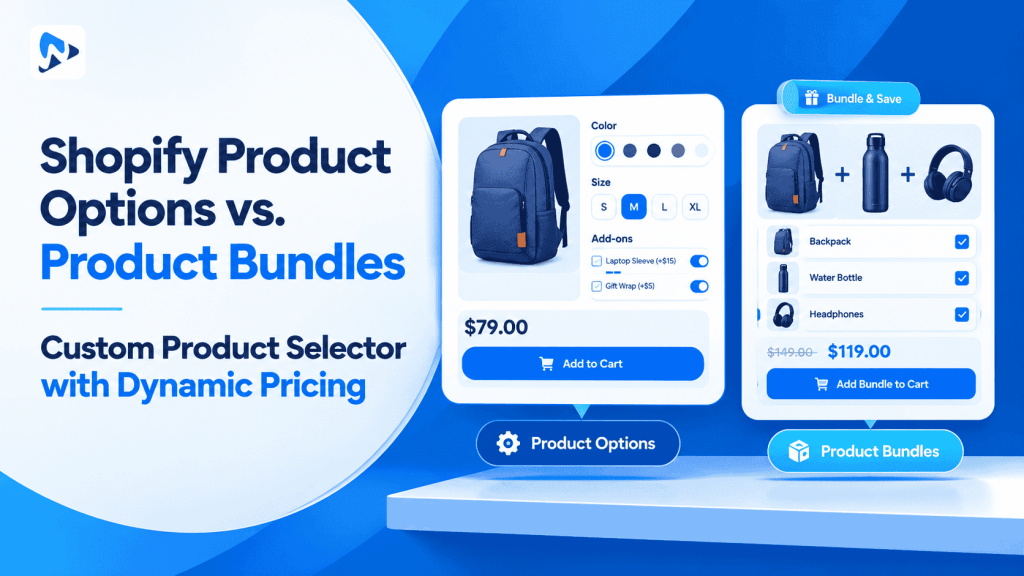
Product options configure customizable attributes on a single product, whereas bundles group multiple existing catalog products into a shared package. According to Shopify Help Center documentation on bundles, native Shopify Bundles combine distinct physical products with existing inventory records into a single parent listing. This approach works well for fixed sets like a skincare routine containing a cleanser, toner, and moisturizer.
However, when shoppers want to configure bespoke products—such as selecting bespoke engraving, custom dimensions, or choosing five flavors out of twenty—standard bundle apps become rigid. Shopify natively supports up to 3 option categories and up to 2,048 variants per product. Using a dedicated product options app avoids variant combination bloat by treating made-to-order personalizations as virtual choices rather than separate inventory products.
Tip: Use bundles when packing pre-assembled inventory from warehouse shelves. Use a custom product selector when shoppers configure personalized attributes, custom text, or optional accessories on demand.
When should you choose a custom option selector over a bundle app?
Choose an option selector when selections depend on modular customization rules rather than pre-packaged goods. Standard bundle tools often force customers to purchase all bundled items together, limiting flexibility for buyers who only want specific components.
| Feature | Shopify Product Bundles | Custom Product Options Selector |
|---|---|---|
| Purchase Model | Pre-grouped distinct products | Single modular configured item |
| Personalization | Restricted to base variants | Text fields, swatches, file uploads |
| Pricing Logic | Fixed price or bundle discount | Dynamic formula and add-on surcharges |
| Catalog Impact | Requires separate parent bundle listings | Zero variant or SKU duplication |
How does dynamic pricing calculate option surcharges in real time?
Dynamic pricing recalculates the product subtotal on the page instantly as shoppers toggle paid add-on fields. When a customer selects a basic option (such as standard packaging), the product displays the baseline price. As the shopper checks optional add-ons, the app applies fixed or percentage-based fee adjustments directly within the storefront interface.
According to Shopify Developer documentation on line items, customer preferences are stored as line item properties. This guarantees that customer choices and calculated totals carry seamlessly from the product detail page into the cart drawer and throughout checkout.
Consider an illustrative example: a customizable insulated water bottle has a base retail price of $45.00. The customer selects custom laser engraving for $10.00 and adds an optional silicone travel pouch for $15.00. The dynamic pricing engine recalculates the live page subtotal to $70.00 ($45.00 base + $10.00 engraving + $15.00 pouch = $70.00 total), submitting both specifications cleanly under one order line item.
How do you manage inventory across customizable product selectors?
Track physical components using native Shopify variant inventory while tracking custom services through line item properties. If your selector includes base physical units (such as 500ml vs. 750ml bottle sizes), track their stock quantities using native Shopify variants.
For custom services like monograms, special engravings, or bespoke gift messages, keep them as virtual options. This decoupled structure prevents inventory desynchronization and ensures fulfillment operators see exact customer notes on packing slips.
How can you set up a custom product selector with dynamic pricing in Shopify?
You can set up a custom product selector with dynamic pricing by building an option set with conditional display rules and price modifiers. Using an Online Store 2.0 theme app embed ensures smooth performance without editing theme templates.
- Install Ultimate Product Options from the Shopify App Store.
- Open your Shopify Admin, navigate to Online Store > Themes > Customize, toggle the Ultimate Product Options app embed to On, and click save.
- Go to Apps > Ultimate Product Options and click Create Option Set.
- Name your option set internally and assign it to your target product or collection.
- Click Add Option to create your base selector fields, such as visual image swatches or button pills.
- Add conditional logic rules (available on the Basic plan at $7.99/month and above) so secondary fields display only when specific choices are clicked.
- Assign price modifiers to premium selections, adding fixed fees or percentage upcharges to each paid add-on.
- Under app settings, enable Dynamic PDP Price Update so the on-page price updates in real time as selections change.
- Save and publish your option set.
- Visit the product page on your storefront, configure a custom selection, add it to the cart, and verify that the updated price and properties display accurately in checkout.
Build Custom Product Selectors with Live Pricing
Create modular option sets, conditional pickers, and dynamic add-on surcharges without code. Free plan available.
The Bottom Line
Deciding between product options and product bundles comes down to whether you are packaging fixed catalog items or enabling made-to-order configurations. Building a custom product selector with dynamic pricing allows shoppers to assemble personalized items with full pricing transparency, while keeping your Shopify store catalog uncluttered by duplicate variants.
Want to try it on your own products? Install Ultimate Product Options free or learn more about the app.
Frequently Asked Questions
Can a custom product selector update prices without creating extra variants?
Yes, dynamic option apps calculate price surcharges directly on the product detail page and pass them through to checkout without creating separate SKU records. This keeps your inventory database clean while allowing flexible pricing.
Do dynamic price changes show up in the customer cart drawer?
Yes, when customers add configured items to their cart, modern options apps update both the item subtotal and custom property descriptions. The full price carries through seamlessly into Shopify checkout.
What is Shopify’s native variant limit per product?
Shopify natively allows up to 3 option names and up to 2,048 variants per product. Using product options lets you provide dozens of modular customizations without hitting variant ceilings.
Can I show or hide options based on previous customer picks?
Yes, conditional logic rules let you display dependent options only when a shopper selects specific parent choices. This feature is available on the Basic plan ($7.99/month) and above.
Do custom line item properties transfer to warehouse packing slips?
Yes, all custom choices recorded as line item properties are included in Shopify order records and webhook payloads. Fulfillment systems like ShipStation can read these properties to ensure accurate assembly.
Related Reading
- How to Add Product Options Without Creating Additional Variants
- How to Offer a Range of Product Options Under 1 Main Product
- How to Dynamically Change Product Prices with Custom Add-Ons
Update Log
October 27, 2026: Published comprehensive comparison guide on product options versus product bundles and creating custom selectors with dynamic pricing.