The B2B Wholesale Blueprint: Country & Customer-Tiered Customization Rules
Managing a hybrid e-commerce store that caters simultaneously to direct-to-consumer (DTC) shoppers and business-to-business (B2B) wholesale accounts is one of the most profitable models on Shopify. However, it presents a delicate merchandising challenge: how do you offer complex wholesale customization without overwhelming regular retail buyers?
A retail buyer ordering a handcrafted ceramic vase or leather weekend bag needs simple options: color, standard monogramming, and standard retail packaging.
A wholesale buyer or luxury exporter ordering 200 units of that same product requires an entirely different operational layer:
- Custom Pantone color matching codes
- Branded corporate debossing and master carton label specifications
- Palletizing requirements and freight packaging selections
- International export compliance certificates and VAT/resale tax exemption uploads
Traditionally, merchants solved this by duplicating their entire catalog—creating parallel "Wholesale" products hidden behind lock apps or managing a completely separate expansion store. This splits inventory counts, creates multi-channel SKU confusion, dilutes SEO rankings, and multiplies catalog maintenance.
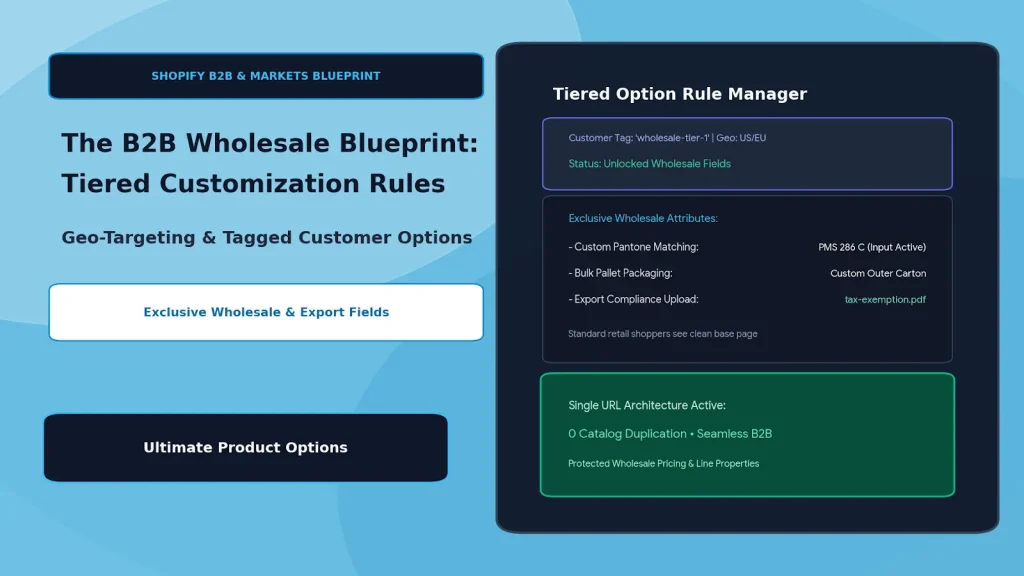
The modern solution is tiered customization rules powered by customer tags and geo-targeting. By using Ultimate Product Options, merchants can host wholesale and retail on a single product URL—conditionally revealing enterprise options exclusively to authenticated wholesale accounts and specific international markets while keeping the page clean for DTC shoppers.
Table of Contents
- The Catalog Dilemma: Why Duplicating Products Breaks Down
- The Architectural Flow: Single-URL Tiered Customization
- 3 Core Pillars of Tiered B2B Customization
- Step-by-Step Setup: Building Tiered B2B Options with Ultimate Product Options
- Frequently Asked Questions (FAQs)
The Catalog Dilemma: Why Duplicating Products Breaks Down
| Hurdle | Separate Wholesale Store / Catalog Duplication | Single-URL Tiered Option Sets |
|---|---|---|
| Catalog Maintenance | Double the work (editing prices, descriptions, and media across 2+ listings) | Edit once on the core product; options display conditionally |
| Inventory Tracking | Fragmented stock allocations across duplicate SKUs | Single centralized pool of warehouse inventory |
| SEO & Domain Authority | Organic traffic and backlinks split across fractured URLs | 100% of backlinks and social proof stay on one canonical URL |
| User Experience (Retail) | Risk of retail shoppers accidentally stumbling into wholesale listings | Retail customers never see intimidating B2B fields |
| User Experience (B2B) | Confusing separate login portals and gated secondary storefronts | Frictionless login that unlocks wholesale attributes instantly |
The Architectural Flow: Single-URL Tiered Customization
                          ┌────────────────────────┐
                          │   Storefront Visitor   │
                          └───────────┬────────────┘
                                      │
                         [Authentication & Geo-Check]
                                      │
            ┌─────────────────────────┴─────────────────────────┐
            ▼                                                   ▼
┌───────────────────────┐                           ┌───────────────────────┐
│ Regular DTC Customer  │                           │ Logged-In B2B Buyer   │
│ (Unauthenticated/Guest│                           │ (Tag: "wholesale-tier")│
└───────────┬───────────┘                           └───────────┬───────────┘
            │                                                   │
            ▼                                                   ▼
┌───────────────────────┐                           ┌───────────────────────┐
│ Clean Standard Layout │                           │ Advanced B2B Layer    │
│ • Color Swatches      │                           │ • Pantone PMS Matcher │
│ • Gift Box Add-On     │                           │ • Master Carton Specs │
│ • Standard Retail Cart│                           │ • Resale Exemption Doc│
└───────────────────────┘                           │ • Tiered Volume Rates │
                                                    └───────────────────────┘
By querying the customer's account tags and market region at the browser level, the option engine determines which attribute layer to inject into the DOM, maintaining a clean storefront while supporting enterprise-grade customization.
3 Core Pillars of Tiered B2B Customization
1. Customer-Tag Conditioning (Role-Based Options)
Using customer account tags (such as b2b, wholesale, or tier-1-distributor), you can conditionally reveal high-touch customization modules:
- Custom Color Matching: An open text field for custom Pantone (PMS) thread or resin codes, requiring a minimum order quantity (MOQ) of 50 units.
- Corporate Asset Ingestion: Drag-and-drop file upload zones for vector branding files (
.ai,.eps,.svg) with instructions for die-cut placement. - Custom Packaging Tiers: Dropdowns for retail packaging vs. bulk polybagging vs. export wooden crate packing.
2. Country & Currency Geo-Targeting (Shopify Markets Alignment)
When selling across borders through Shopify Markets, compliance and shipping specifications vary by country:
- Market-Specific Compliance Uploads: Display mandatory export documentation fields, such as requiring UK/EU buyers to attach EORI or VAT certificates prior to cart submission.
- Localized Measurement Standards: Show metric dimension inputs (centimeters/meters) to European and Asian buyers while automatically serving imperial units (inches/feet) to North American clients.
- Localized Voltage/Plug Selectors: Restrict hardware electrical choices (e.g., 110V Type-A vs. 230V Type-G) based on the visitor’s shipping destination.
3. Tier-Based Pricing Modifiers & Tooling Surcharges
Wholesale orders frequently require one-time tooling, plate, or die setup charges that retail buyers shouldn't bear:
- Setup Fee Line Items: Automatically inject a
$75.00 Custom Tooling Feeto the first production run for tagged wholesale accounts. - Tiered Price Deductions: Enforce negative price adjustments or volume-discounted option sets based on order batch tiers without having to manipulate native variant matrices.
Step-by-Step Setup: Building Tiered B2B Options with Ultimate Product Options
Configuring role-gated and country-specific option sets on Shopify requires no custom theme code when using Ultimate Product Options.
Step 1: Install Ultimate Product Options
Install Ultimate Product Options from the Shopify App Store and ensure the app embed block is toggled to Active in your Online Store 2.0 theme customizer.
Step 2: Build the Core Option Set
- In your Shopify admin, open Apps > Ultimate Product Options.
- Click Create Option Set and title it (e.g., B2B Leather Catalog - Wholesale Add-Ons).
- Under Targeting, assign this set to your flagship products or shared B2B/DTC collections.
Step 3: Configure Customer Tag Rules
- In the option set settings, navigate to Visibility & Display Conditions.
- Set the condition rule to:
Customer Tag > Equals > "wholesale". - Add sub-rules if you have multiple tiers (e.g.,
wholesale-goldvs.wholesale-silver). - Result: Unauthenticated visitors and standard retail buyers will bypass these fields entirely, seeing only your clean retail layout.
Step 4: Add Enterprise Wholesale Fields
Populate the set with B2B-specific option types:
- Pantone Color Matching (Text Input): Set label to
Enter Pantone PMS Code (MOQ 50 units). Enforce required validation. - Custom Tooling / Embossing Plate (Checkbox with Price Modifier): Set to
Create Custom Brass Embossing Die (+$85.00). - Artwork Upload (File Upload): Allow
.ai, .eps, .pdfvector file formats with capacity up to 100MB. - Export Compliance / Resale Certificate (File Upload): Label as
Upload Tax Exemption / VAT Documentation.
Step 5: Configure Geo-Targeting & Shopify Markets Rules
- For export-specific options, select Geo-Targeting Rules.
- Restrict compliance file uploads or regional plug configurations to visitors browsing from specific countries or Shopify Market domains (e.g., EU Market or UK Store).
Step 6: Verify Cart Line-Item Properties
Test the configuration by logging in with a tagged test account:
- As a guest: verify the product page displays only retail choices.
- As a wholesale user: verify the B2B fields, file dropzones, and Pantone inputs appear dynamically.
- Complete a checkout: verify all wholesale choices pass cleanly into Shopify Admin order details as structured line-item properties for your operations and warehouse team.
Frequently Asked Questions (FAQs)
Can unauthenticated visitors see B2B options or wholesale pricing?
No. When an option group is conditioned on customer tags, the script checks authentication before rendering the fields. Unauthenticated guests and standard customers will only see your standard retail options.
Does this work alongside Shopify Markets?
Yes. Ultimate Product Options supports geo-targeting rules that correspond with Shopify Markets country selectors, allowing you to show specific document uploads, units of measurement, or options based on the shopper's location.
Do file uploads like VAT certificates transfer into our ERP or 3PL?
Yes. Any files uploaded by the customer are stored on high-speed CDNs and attached directly to the order line-item properties, making them accessible via Shopify Admin, CSV export, and REST/GraphQL APIs.
Conclusion
Scaling B2B and export sales shouldn't require fragmenting your catalog or compromising your DTC customer experience. By leveraging customer-tag conditioning and geo-targeted rules, you create a tailored shopping journey for both retail buyers and high-volume wholesale accounts on a single product page.
With Ultimate Product Options, implementing role-based option visibility, file uploads, and enterprise pricing on Shopify is clean, fast, and completely code-free.