AI-Driven Visual Merchandising: Converting Product Screenshots into Live Option Sets in Seconds
Managing complex customization catalogs is one of the most tedious operational hurdles on Shopify. For rapidly scaling DTC brands, high-velocity dropshippers, and multi-brand retailers migrating hundreds of SKUs from legacy platforms, setting up customizable product pages usually means hours of repetitive manual data entry.
Configuring a single personalized item—like a bespoke leather bag, custom jewelry piece, or modular computer setup—often requires building 20 to 40 individual attributes:
- Creating separate option groups for materials, sizes, and hardware
- Entering color swatches and mapping hex codes
- Setting up text fields with character caps and typography rules
- Coding conditional logic trees to show or hide dependent add-ons
Multiply that across 50, 100, or 1,000 SKUs, and the launch velocity of your catalog stalls.
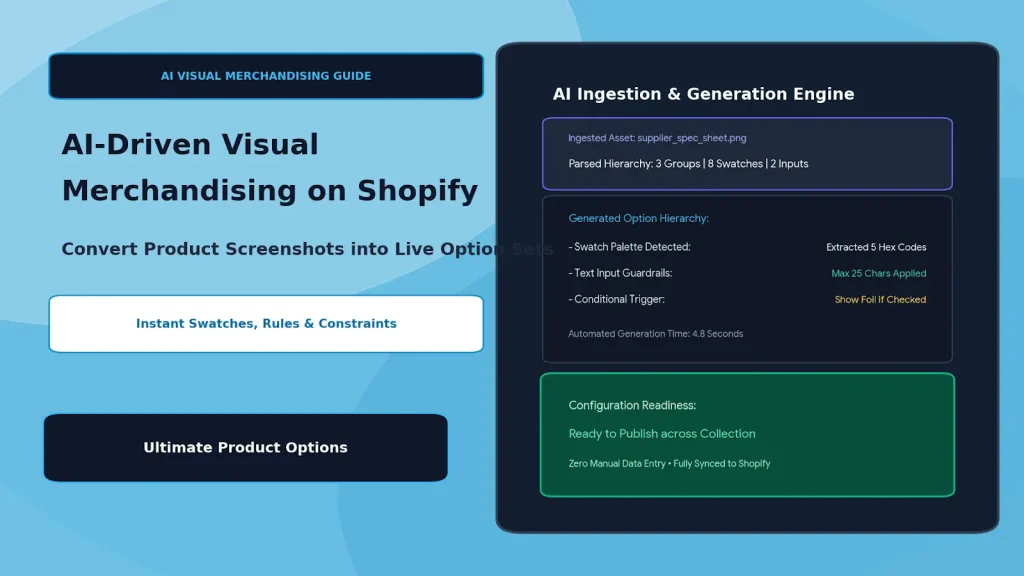
By leveraging visual screenshot ingestion and prompt-assisted setup via Ultimate Product Options, e-commerce teams can eliminate hours of manual entry by transforming supplier spec sheets, competitor layouts, and product mockups into fully configured option sets in seconds.
Table of Contents
- The Catalog Bottleneck: Why Manual Option Creation Doesn't Scale
- How Visual Ingestion & AI Automation Works
- Manual Setup vs. AI-Assisted Option Ingestion
- 4 Ways Merchants Use AI Automation to Scale Product Configurators
- Step-by-Step Setup: Building Option Sets Faster with Ultimate Product Options
- Frequently Asked Questions (FAQs)
The Catalog Bottleneck: Why Manual Option Creation Doesn't Scale
Traditional e-commerce merchandising workflows rely on fragmented spreadsheets and manual form builders. This manual approach introduces major operational pain points:
- High Labor Overhead: Creating 30+ custom fields per SKU manually takes an average of 25–45 minutes per product.
- Human Input Errors: Inconsistent hex codes, missing min/max text limits, or broken conditional triggers lead to mismatched orders and customer refunds.
- Delayed Time-to-Market: Trending products, seasonal collections, and dropship catalogs lose their window of maximum profitability while waiting in the data-entry backlog.
- Catalog Migration Friction: Migrating complex configurators from Magento, WooCommerce, or custom platforms to Shopify often requires rebuilding option hierarchies from scratch.
How Visual Ingestion & AI Automation Works
┌─────────────────────────────────────────────────────────────┐
│                 Inbound Product Asset / Spec Sheet          │
│        (Supplier Sheet, Competitor URL, or Mockup Image)    │
└──────────────────────────────┬──────────────────────────────┘
                               │
                               ▼
┌─────────────────────────────────────────────────────────────┐
│            Visual Extraction & Hierarchy Detection          │
│    • Identifies Option Types: Swatches, Inputs, Checkboxes  │
│    • Extracts Labels: "Strap Color", "Engraving Font"        │
│    • Detects Dependencies: "Show Foil if Monogram = True"   │
└──────────────────────────────┬──────────────────────────────┘
                               │
                               ▼
┌─────────────────────────────────────────────────────────────┐
│          Structured Template Generation (Seconds)           │
│   • Generates Option Tree with Strict Character Caps        │
│   • Maps Hex Colors & Texture Swatches                      │
│   • Assigns Pricing Modifiers & Conditional Triggers        │
└──────────────────────────────┬──────────────────────────────┘
                               │
                               ▼
┌─────────────────────────────────────────────────────────────┐
│    Live, Ready-to-Buy Shopify Configurator on Product Page  │
└─────────────────────────────────────────────────────────────┘
Instead of manually clicking "Add Field," selecting input types, and copy-pasting attribute names, visual ingestion parses the visual layout or specification sheet, automatically scaffolding the entire configuration structure.
Manual Setup vs. AI-Assisted Option Ingestion
| Operational Task | Traditional Manual Configuration | Visual Ingestion via Ultimate Product Options |
|---|---|---|
| Setup Time Per SKU | 30–45 minutes | Under 60 seconds |
| Field Creation | Click, label, and save each input individually | Batch-generated from image or structured prompt |
| Color & Swatch Mapping | Manual hex code lookups and image uploads | Auto-extracted color swatches and values |
| Conditional Logic Setup | Complex, multi-branch conditional mapping | Auto-inferred rule trees and dependency flags |
| Catalog Migration | Manual rebuild or fragile CSV imports | Instant visual reconstruction from screenshots |
4 Ways Merchants Use AI Automation to Scale Product Configurators
1. Ingesting Supplier Spec Sheets & Line Sheets
B2B importers and dropshippers receive wholesale catalogs as PDFs or raw images. Visual parsing extracts material variations, dimensions, and finishing options directly from these spec sheets, turning raw wholesale data into storefront-ready selectors instantly.
2. Rapid Competitor & Market Prototyping
Merchants launching private-label goods can take a screenshot of a high-converting layout or configurator workflow, feed it into the builder, and automatically generate an identical option hierarchy—including text boxes, swatch styles, and layout flow.
3. Automated Validation & Input Constraints
Prompt-based configuration auto-populates logical guardrails:
- Character Counters: Auto-restricts monograms to 3 characters or custom inscriptions to 25 characters.
- File Upload Constraints: Automatically whitelists high-res formats (
.ai,.svg,.png) and sets minimum DPI rules. - Pricing Rules: Automatically formats flat-rate surcharges for luxury finishes or rush options.
4. Bulk Template Deployment Across Automated Collections
Once generated, the option set isn't trapped on a single product. Merchants can target the generated template to entire Shopify collections or product tags, making catalog-wide updates instantaneous.
Step-by-Step Setup: Building Option Sets Faster with Ultimate Product Options
Setting up advanced product options on Shopify is simple and code-free using Ultimate Product Options.
Step 1: Install Ultimate Product Options
Install Ultimate Product Options from the Shopify App Store and ensure the app embed block is toggled to Active in your Online Store 2.0 theme customizer.
Step 2: Create a New Option Set Template
- In your Shopify Admin, navigate to Apps > Ultimate Product Options.
- Click Create Option Set.
- Name your template (e.g., Automated Leather Configurator).
- Assign targeting rules to attach the options to a specific product or an automated collection (e.g.,
product_type == "Bespoke Bag").
Step 3: Define Option Fields Rapidly
Use pre-built component blueprints to build your option structure:
- Visual Swatches: Add multi-color swatches, texture images, or dual-tone finishes with automatic tooltips.
- Personalization Inputs: Add text input fields, font family selectors, and live character counters.
- File Upload Dropzones: Enable high-capacity file upload zones for artwork, vectors, or reference photos.
Step 4: Apply Dynamic Pricing & Conditional Rules
- Assign price modifiers to premium selections (e.g.,
+$15.00 for Gold Foil Stamping). - Add conditional rules: only display the Monogram Text Field and Foil Swatches when the customer checks
Add Personalization.
Step 5: Save, Preview, and Deploy
Preview your configurator directly within the admin to test validation rules, dynamic price updates, and responsive mobile behavior. Once approved, click Publish to make the configurator live instantly across your targeted storefront pages.
Frequently Asked Questions (FAQs)
Can AI extraction accurately detect hex codes from images?
Yes. Visual ingestion tools analyze color pixel values from uploaded swatches or spec sheets and map them to their closest web-safe hex equivalents or extract the macro image crop directly.
Can I edit the generated options after automated ingestion?
Yes. Every field, label, swatch, and price rule remains fully customizable within the Ultimate Product Options drag-and-drop builder after generation.
Does this replace Shopify's native variants?
It works alongside them. The app manages visual choices and add-on properties as line-item attributes, bypassing Shopify's 100-variant ceiling while maintaining accurate inventory tracking on your base SKUs.
Conclusion
Manual data entry shouldn't be the bottleneck that limits your catalog expansion. Leveraging visual layouts and automated scaffolding turns a multi-hour configuration ordeal into a seamless, seconds-long workflow.
With Ultimate Product Options, Shopify merchants can build rich, high-converting product configurators—complete with swatches, conditional logic, and custom pricing—without touching a line of code.