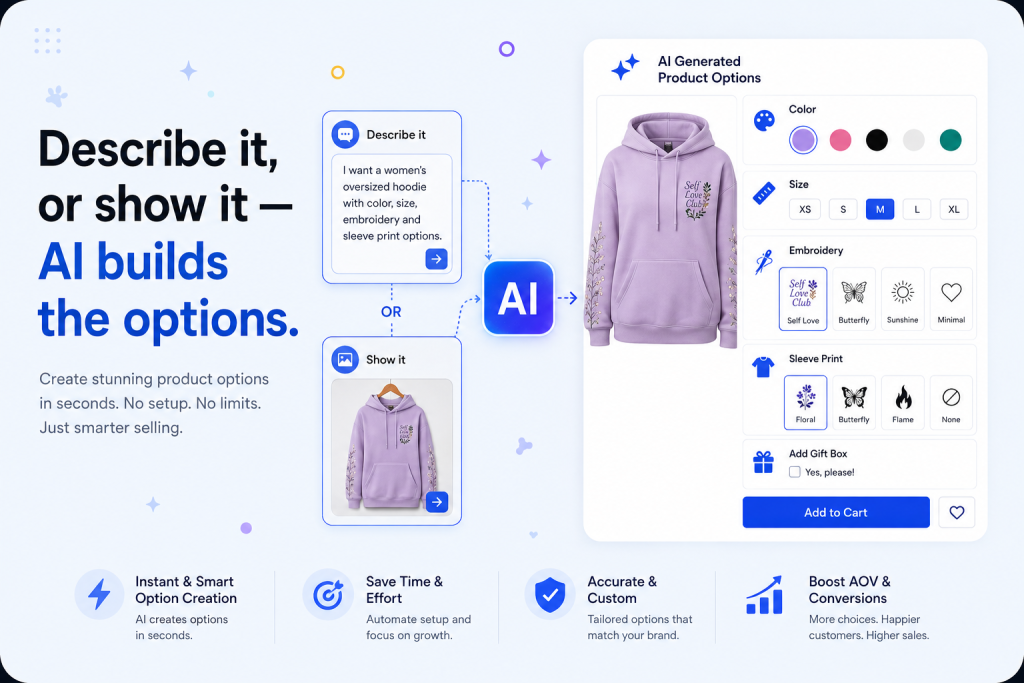
Ultimate Product Options uses AI to turn a plain-language prompt or a single screenshot into a fully working product option set, no manual setup required.
What are AI product options?
AI product options are customization fields size, color, engraving text, add-ons generated automatically instead of built by hand. Rather than clicking through settings screens field by field, a merchant either describes what they want or shows an example, and the AI assembles a working option set from that input.
This matters because product options directly influence conversion and average order value, but manually configuring them across a large catalog is slow and easy to get wrong. AI collapses that setup time from hours to minutes.
Two ways to generate an option set
Both methods produce the same kind of result a live, editable option configuration. They differ only in how you communicate the request.
Prompt-based creation
Type a plain-language description of the options you need, and the AI generates matching fields, dropdowns, or swatches.
- Write a short prompt describing the options e.g. “size, color, and a 20-character engraving field”
- The AI interprets the request and builds the matching option set
- Review, adjust if needed, and publish
Screenshot-based creation
Upload an image of an option layout you want to replicate, and the AI rebuilds it as a working configuration.
- Upload a screenshot of any option layout — from a website or design reference
- The AI identifies the option types, structure, and styling in the image
- A matching, functional configuration is generated for your products
Which one should you use?
You already know which fields and logic you need, or you’re rolling the same options out across several products quickly.
You have a visual example to match, or you’re migrating an existing option layout from another store or theme.
Many merchants use both together: a screenshot to establish the visual structure, then a prompt to fine-tune labels, pricing rules, or conditional logic on top of it.
Common questions
What is prompt-based product option creation?
A method where you type a plain-language description of the options you want, and AI automatically generates the corresponding fields, dropdowns, or swatches.
What is screenshot-based product option creation?
A method where you upload an image of an existing product options layout, and AI analyzes it to rebuild a matching, functional option set.
Do I need coding or design skills to use either method?
No. Both are built for merchants without technical or design experience — you describe or show what you want, and the AI builds it.
Can I edit AI-generated product options afterward?
Yes. Every AI-generated option set is fully editable, so you can adjust labels, pricing rules, or conditional logic after setup.
Which method is faster?
Prompt-based is usually faster when you already know the exact fields you need. Screenshot-based is faster when you have a visual reference and don’t want to describe the layout in words.
Say it or show it — the setup takes minutes either way.
Prompt-based creation works best when you know what to say. Screenshot-based creation works best when you have something to show. Together, they make advanced product configuration accessible to any merchant, regardless of technical skill.