The "Edit in Cart" Retention Lever: Solving Post-Cart Customization Regret
In personalized gifts, custom-tailored apparel, fine jewelry, and made-to-order goods, the customer journey is emotionally charged. A shopper building a custom leather monogrammed tote or engraved anniversary watch invests minutes choosing the right leather finish, picking typography, testing foil swatches, and entering a loved one's initials.
Then, they reach the cart or flyout drawer to review their selection.
Suddenly, doubt creeps in:
- "Wait, did I type 'Sarah' with an 'h' or without?"
- "Would this look better in Rose Gold instead of Yellow Gold?"
- "Should I add the custom gift box after all?"
On most standard Shopify stores, resolving that simple hesitation requires a brutal user experience: the customer must delete the item from the cart, navigate back to the product page, and rebuild the entire configuration from scratch.
For high-volume gift and personalized brands, this is a major conversion killer. Over 30% of shoppers who delete a custom item from their cart never complete the re-configuration—they bounce, and the sale is lost forever.
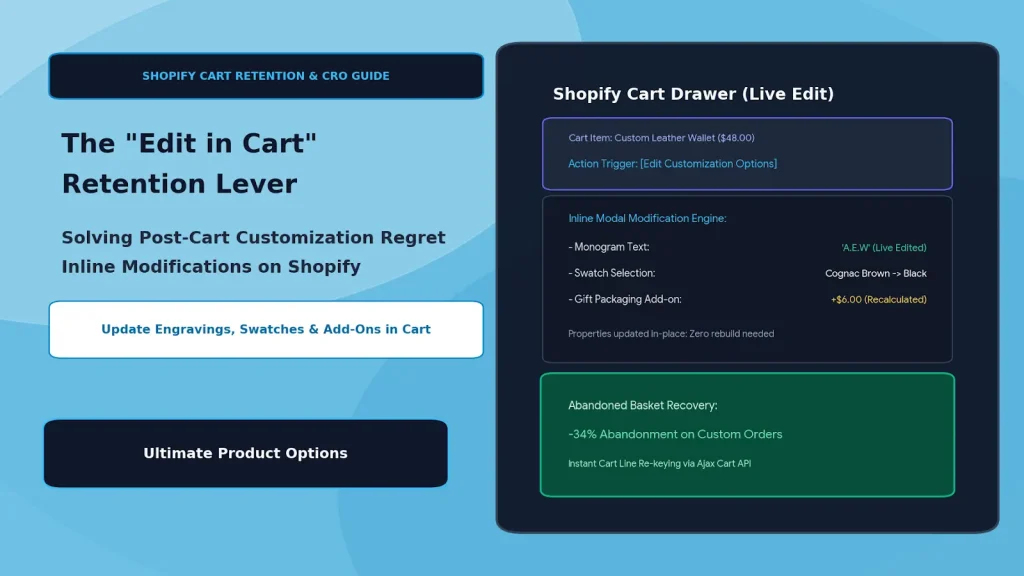
The solution is enabling inline cart editing. By allowing shoppers to adjust text inputs, swatches, file uploads, and add-on accessories directly inside the cart drawer without losing their place, merchants eliminate post-cart regret and recover abandoned baskets using Ultimate Product Options.
Table of Contents
- The "Delete and Rebuild" Cycle: Why Custom Carts Abandon
- The Inline Modification Flow: Seamless Post-Cart Adjustments
- CRO Comparison: Standard Cart vs. Inline Editable Cart
- Step-by-Step Setup: Enabling Inline Cart Editing with Ultimate Product Options
- 4 Best Practices for Post-Cart Customization Retention
- Frequently Asked Questions (FAQs)
The "Delete and Rebuild" Cycle: Why Custom Carts Abandon
When an e-commerce store lacks inline option modification, it introduces four severe friction points into the checkout funnel:
- High Cognitive Reset: Re-selecting 5 to 8 interdependent options forces the customer to duplicate cognitive effort they already expended, triggering decision fatigue.
- Loss of Cart Context: Navigating away from the cart breaks the forward momentum toward checkout, opening the door for second thoughts, distraction, or price sensitivity.
- Typo Paranoia: When customers cannot easily click to double-check their custom engraving text in an editable view, fear of receiving a non-refundable, misspelled custom item causes them to abandon the cart completely.
- Accidental Duplicate Line Items: Shoppers often navigate back, build an amended item, and add it—only to find both the old and new items in their cart, creating confusion at checkout.
The Inline Modification Flow: Seamless Post-Cart Adjustments
┌─────────────────────────────────────────────────────────────┐
│                    Customer Cart Drawer                     │
│   • Bespoke Leather Wallet ($48.00)                         │
│   • Monogram: "J.R.W" | Foil: Silver | Finish: Tan          │
└──────────────────────────────┬──────────────────────────────┘
                               │
                               ▼
┌─────────────────────────────────────────────────────────────┐
│              Trigger: [Edit Custom Options]                 │
│              (Appears directly beside the item)             │
└──────────────────────────────┬──────────────────────────────┘
                               │
                               ▼
┌─────────────────────────────────────────────────────────────┐
│           Inline Edit Modal (Pre-Populated State)           │
│   • Monogram Input: Pre-filled with "J.R.W" (Editable)      │
│   • Swatch Selector: Toggle from "Silver" ➔ "Gold Foil"     │
│   • Checkbox Add-On: Toggle "Luxury Gift Packaging (+$6)"   │
└──────────────────────────────┬──────────────────────────────┘
                               │
                               ▼
┌─────────────────────────────────────────────────────────────┐
│              Shopify Ajax Cart Line Replacement             │
│   • Line item properties updated seamlessly in-place        │
│   • Pricing recalculates instantly via Ajax Cart API        │
│   • Zero page reloads • Zero lost momentum                  │
└─────────────────────────────────────────────────────────────┘
By pre-populating an interactive modal or drawer with the customer’s existing choices, the shopper can adjust a single attribute in seconds and proceed directly to checkout.
CRO Comparison: Standard Cart vs. Inline Editable Cart
| Metric / Scenario | Standard Shopify Cart ("Delete & Rebuild") | Inline Editable Cart (Ultimate Product Options) |
|---|---|---|
| Typo Correction Time | 2–3 minutes (delete, browse, rebuild) | 5–10 seconds (edit in-place modal) |
| Abandonment on Revision | ~35%–42% bounce rate | Reduced by up to 34% |
| Cart Momentum | Interrupted (sent back to catalog) | Continuous (remains in the checkout flow) |
| AOV Upsell Opportunity | Zero (hard to add forgotten upgrades) | High (easy to toggle forgotten gift wrap or rush prep) |
| Support Ticket Volume | High ("Can you fix the name on my order?") | Low (customers self-correct before checkout) |
Step-by-Step Setup: Enabling Inline Cart Editing with Ultimate Product Options
Activating inline option modifications on Shopify requires no custom theme template modifications when using Ultimate Product Options.
Step 1: Install & Verify Theme Embed
- Install Ultimate Product Options from the Shopify App Store.
- Inside your Shopify Online Store 2.0 Theme Editor, verify that the app embed block is toggled to Active.
Step 2: Enable the "Edit in Cart" Feature Flag
- Open Apps > Ultimate Product Options in your Shopify Admin.
- Navigate to Settings > Cart & Drawer Integration.
- Toggle the Enable "Edit Options in Cart" switch to ON.
- Choose your preferred interaction style:
- Slide-Out Drawer / Modal: Opens an overlay containing all the product's option inputs pre-filled with the current values.
- Accordion / Expandable Row: Expands the option fields directly beneath the line item inside the cart page.
Step 3: Customize the Action Trigger & Styling
- Set the button text:
Edit OptionsorChange Customization. - Match the button typography, color palette, and micro-copy to your theme's native styling.
- Configure the Save Changes button label (e.g.,
Update Customization).
Step 4: Configure Real-Time Price Adjustment Handlers
When customers toggle paid add-ons in the cart (such as adding $5.00 for Gold Foil or $8.00 for Gift Wrapping):
- The app utilizes the Shopify Ajax Cart API (
/cart/change.js). - The existing cart line item is dynamically updated with the revised line-item properties and associated pricing modifiers.
- Cart subtotal, tax lines, and progress bars (e.g., free shipping thresholds) recalculate in real time without refreshing the page.
Step 5: Test on Desktop and Mobile
Verify the flow across multiple scenarios:
- Add a customized product with monogram text and color swatches to your cart.
- In the cart drawer, click Edit Options.
- Modify a character in the text field and swap a swatch color.
- Click Update: confirm the line-item properties refresh instantly and the total checkout value updates accurately.
4 Best Practices for Post-Cart Customization Retention
- Surface High-Margin Add-Ons in the Edit Modal: The edit modal is an ideal secondary touchpoint to upsell accessories like premium gift boxes, anti-tarnish jewelry pouches, or extended warranties that shoppers skipped on the product page.
- Keep Mobile Modals Full-Screen: On mobile screens, display the edit modal as a native-feeling full-screen bottom sheet with oversized, thumb-friendly touch targets.
- Display Clean Property Summaries on Line Items: Ensure your cart drawer displays the active custom properties (e.g.,
Monogram: "A.E.W",Metal: Rose Gold) clearly beneath the product title so shoppers can review without opening the modal unless needed. - Auto-Focus the First Editable Field: When the edit modal opens, place focus directly on the relevant input so shoppers can immediately make their change without scrolling.
Frequently Asked Questions (FAQs)
Does inline cart editing work with slide-out cart drawers?
Yes. Ultimate Product Options supports native Online Store 2.0 cart drawers, theme flyout mini-carts, and dedicated /cart pages without theme conflicts.
What happens if a shopper changes an option that has an extra fee?
The app interacts directly with the Shopify Ajax Cart API to recalculate line-item subtotals and dynamic price surcharges instantly, reflecting updated cart totals without a browser reload.
Can customers re-upload or change files directly inside the cart?
Yes. The edit modal includes the file upload dropzone, allowing shoppers to swap or re-upload high-resolution artwork before heading to final checkout.
Conclusion
Every added step between cart addition and checkout completion drains conversion volume. For personalized and made-to-order merchants, forcing customers to delete and rebuild custom products due to minor second thoughts is an unnecessary conversion leak.
Enabling inline cart modifications empowers shoppers to self-correct typos, adjust finishes, and add last-minute gift options without friction.
With Ultimate Product Options, high-volume personalization brands can deploy inline cart editing in minutes, protecting buyer momentum and significantly reducing abandoned carts.