How to Bulk-Assign Custom Option Templates Across 1,000+ Products in Seconds
Managing personalized products on Shopify is straightforward when you only have five or ten items. But as your catalog grows into hundreds or thousands of SKUs—such as an entire jewelry catalog needing custom engraving, an apparel line requiring size swatches, or seasonal holiday promotions requiring gift-wrapping add-ons—manual setup becomes unsustainable.
Opening each product individually to recreate option fields, upload color swatches, or configure price add-ons wastes dozens of hours and introduces human error.
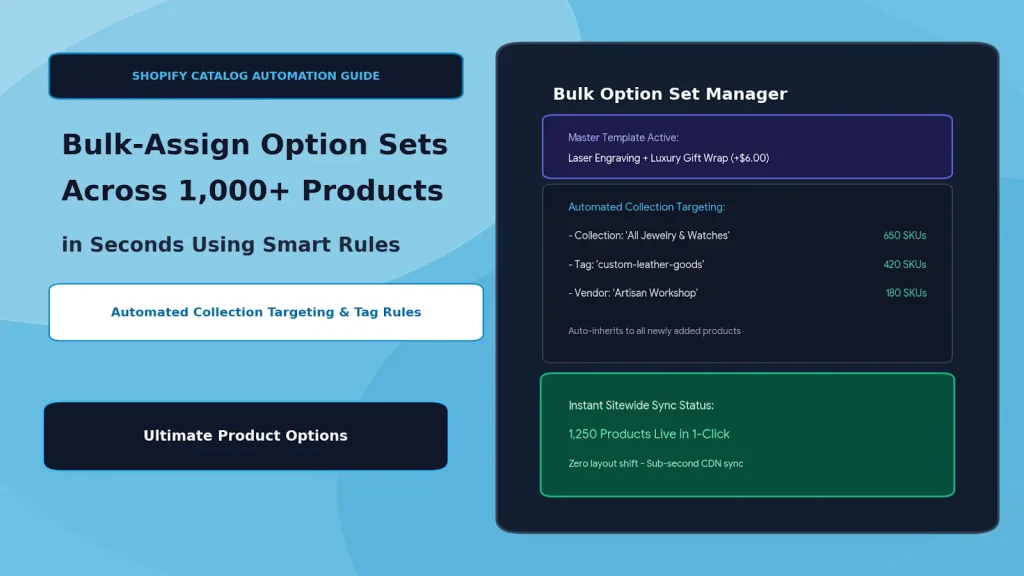
To scale efficiently, high-volume merchants rely on bulk product options on Shopify. By creating reusable option templates and pairing them with automated collection targeting and smart assignment rules, you can apply, update, or remove custom options across 1,000+ products in seconds.
Table of Contents
- The Operational Cost of Manual Option Assignment
- How Template-Based Bulk Assignment Works
- 4 Smart Targeting Methods for Bulk Custom Options
- Step-by-Step Tutorial: Bulk-Assigning Options with Ultimate Product Options
- Real-World Use Cases: Sitewide Rollouts in Action
- Best Practices for High-Volume Catalog Customization
- Frequently Asked Questions (FAQs)
The Operational Cost of Manual Option Assignment
Setting up options on a product-by-product basis creates severe operational bottlenecks for growing stores:
- Massive Labor Costs: Manually configuring options on 500 products at 5 minutes per product takes over 41 hours of repetitive work.
- Inconsistent Buyer Experience: When fields are set up manually, typos in labels, missing swatch hex codes, or inconsistent pricing add-ons inevitably slip through.
- Slow Seasonal Campaign Launches: Launching a sitewide holiday gift-wrapping option or Black Friday rush-processing add-on requires editing every single product before the sale starts.
- Maintenance Headaches: If a material upcharge increases from $5.00 to $7.00, updating it across your entire catalog requires another round of manual edits.
How Template-Based Bulk Assignment Works
Instead of hardcoding option fields directly into individual products, modern option management uses a Template & Target architecture.
┌─────────────────────────────────────────────────────────────────┐
│                    Master Option Template                       │
│        (e.g., "Laser Engraving + Gift Box + Rush Fee")          │
└────────────────────────────────┬────────────────────────────────┘
                                 │
                 ┌───────────────┴───────────────┐
                 ▼                               ▼
     [ Automated Collection ]          [ Product Tag Rule ]
     "All Rings & Necklaces"           "tag: personalized-apparel"
     (Applies to 650 Products)         (Applies to 420 Products)
                 │                               │
                 └───────────────┬───────────────┘
                                 ▼
         [ 1,070+ Storefront Products Updated Instantly ]
When you edit a field, adjust an add-on price, or change a swatch color in the master template, the change cascades dynamically to every targeted product across your entire store in real time.
4 Smart Targeting Methods for Bulk Custom Options
When you apply option sets to collections on Shopify, using the right assignment rule ensures new products inherit customizations automatically:
| Targeting Method | How It Works | Best For |
|---|---|---|
| Collection Targeting | Assigns the template to manual or automated Shopify collections. Any product added to the collection in the future inherits the options automatically. | Category-wide options (e.g., all Rings, all Canvas Art, all T-Shirts) |
| Product Tag Targeting | Attaches options based on Shopify product tags (e.g., tag: customizable, tag: holiday-gift). |
Cross-category campaigns and specific fulfillment types |
| Product Type & Vendor | Targets items based on native Shopify product types or manufacturing vendors. | Supplier-specific customization workflows and B2B setups |
| Sitewide (All Products) | Applies the template globally across every current and future SKU in your store. | Universal add-ons like Holiday Gift Wrapping or Priority Shipping Protection |
Step-by-Step Tutorial: Bulk-Assigning Options with Ultimate Product Options
Follow these steps to build a master template and assign it to 1,000+ products in under two minutes using Ultimate Product Options.
Step 1: Install Ultimate Product Options
Install Ultimate Product Options from the Shopify App Store. Enable the app embed in your theme customizer.
Step 2: Create a New Master Option Set
- In your Shopify admin, open Apps > Ultimate Product Options.
- Click Create Option Set.
- Name your template clearly (e.g., Jewelry Engraving & Gift Packaging Master).
Step 3: Add Your Custom Fields & Swatches
Construct the option fields that should appear across your targeted catalog:
- Text Input:
Enter Custom Engraving (Max 25 Chars)with character limit rules. - Font Picker: Curated typography styles (Serif, Sans, Cursive).
- Radio / Swatch Add-On:
Premium Velvet Gift Box (+$6.00).
Step 4: Set Bulk Assignment Rules
In the Product Assignment / Targeting section of the option set editor:
- Select Collections and choose your target collections (e.g., All Rings, All Bracelets, All Necklaces).
- Or select Product Tags and enter
customizable. - To exclude specific items, use the Exclusion Rule filter to omit clearance or non-customizable SKUs.
Step 5: Save & Instant Sitewide Sync
Click Save & Publish. The app immediately links the option set to all matching products. Visit any product within the targeted collections on your storefront to confirm that the options and price calculations render instantly.
Real-World Use Cases: Sitewide Rollouts in Action
1. Instant Holiday Packaging Upcharges (Q4 Strategy)
During the holiday shopping rush, add a universal "Gift Box & Handwritten Card (+$5.00)" option set targeted to All Products. After the holiday season ends, disable the option set in one click to remove it sitewide without touching a single product page.
2. Print-on-Demand Artwork Uploads
If you run a print-on-demand store with 2,000 poster and apparel SKUs, create one master High-Resolution File Upload template and assign it to your Custom Print Collection. Every newly imported SKU from your POD supplier automatically gets the upload dropzone.
3. Uniform Sizing and Material Upgrades
Maintain consistent wood finish swatches (Oak, Walnut, Pine) across 800 custom furniture items. If supplier costs change, update the price add-on in the master template once, and all 800 product pages update immediately.
Best Practices for High-Volume Catalog Customization
- Leverage Automated Smart Collections: Combine Shopify automated collection conditions (e.g.,
Product Title contains "Custom") with Ultimate Product Options. When new inventory is added to Shopify, it inherits customization fields with zero manual setup. - Use Priority Stacking for Overlapping Rules: If a product belongs to two collections with different option sets, set display priority numbers inside the app to control which option set takes precedence.
- Keep Master Template Naming Organized: Use descriptive naming conventions (e.g.,
[Global] Gift Wrap Addonor[Apparel] Monogram Suite) so your team can easily audit assignments. - Test via Staging Exclusions: When rolling out complex conditional logic changes, test the option set on a hidden test collection before assigning it to your primary high-traffic collections.
Frequently Asked Questions (FAQs)
How long does it take for bulk changes to appear on my live store?
Changes apply virtually instantly. Because options are rendered via dynamic app blocks based on targeting rules, editing or publishing a master template updates all 1,000+ products in seconds without slow database re-indexing.
What happens when I add a new product to a targeted collection?
The new product automatically inherits the option template immediately upon being added to the collection. You do not need to re-open the app or configure anything manually.
Can I apply multiple option sets to the same product?
Yes. A product can inherit multiple option sets (for example, a category-specific Ring Sizing set combined with a sitewide Holiday Gift Box set). The app merges the option groups seamlessly on the product page.
Will bulk option sets slow down my Shopify storefront?
No. Using Ultimate Product Options, option templates load asynchronously using Shopify Online Store 2.0 app blocks and high-speed CDN caching, ensuring fast page load speeds even across massive catalogs.
Conclusion
Scaling a customizable e-commerce business shouldn't mean spending dozens of hours doing repetitive data entry. By shifting to template-based option management, you can launch sitewide seasonal promotions, update pricing modifiers, and roll out complex personalization rules across thousands of products in seconds.
With Ultimate Product Options, automated collection targeting, tag rules, and instant bulk sync give you complete control over your catalog with zero code.