Let’s be honest – everyone loves a good deal. And as a Shopify store owner, offering the right Shopify discounts at the right moment can be the difference between a cart that gets abandoned and a sale that closes.
But discounting isn’t just about slashing prices. Done right, it drives urgency, rewards loyalty, moves slow inventory, and builds long-term customer relationships. Done wrong, it erodes your margins and trains customers to never pay full price.
In this guide, we’re going to walk through everything you need to know about creating discounts in Shopify in 2026 – from the basics of the Discounts dashboard to advanced strategies that top-performing stores are using right now.
Whether you’re setting up your first discount code or looking to refine your promotional strategy, you’re in the right place. Let’s get into it.
Why Shopify Discounts Matter More Than Ever in 2026
Consumer behavior has changed significantly over the last few years. With economic uncertainty, rising ad costs, and fierce eCommerce competition, shoppers are more price-conscious than ever. A well-timed discount isn’t just a nice-to-have – it’s a conversion tool.
Here’s what the data tells us:
- 69% of online shoppers say discounts influence their purchase decision (Statista, 2025)
- Stores that use automatic Shopify discounts see up to 18% higher average order values
- Cart abandonment drops by as much as 25% when a discount is applied at checkout
- Loyalty discounts increase repeat purchase rates by 30–40% on average
Shopify has also significantly improved its native discount engine in 2025–2026, adding support for combined discount types, improved analytics, and deeper app integrations. This means you have more tools than ever – and using them strategically is key.
Understanding the Types of Shopify Discounts
Before you start creating discounts, you need to understand what’s available. Shopify offers four core discount types natively, and each serves a different purpose.
| Discount Type | Best For | Example Use Case |
| Percentage Off | Sitewide or seasonal sales | 20% off all products for Black Friday |
| Fixed Amount Off | High-ticket items or cart minimums | $30 off orders over $150 |
| Free Shipping | Reducing cart abandonment | Free shipping on orders over $75 |
| Buy X Get Y (BXGY) | Increasing units per transaction | Buy 2 get 1 free on skincare bundles |
You can apply these discounts as either discount codes (customer enters a code) or automatic discounts (applied without any action from the customer). Both have their place, and we’ll cover when to use each one.
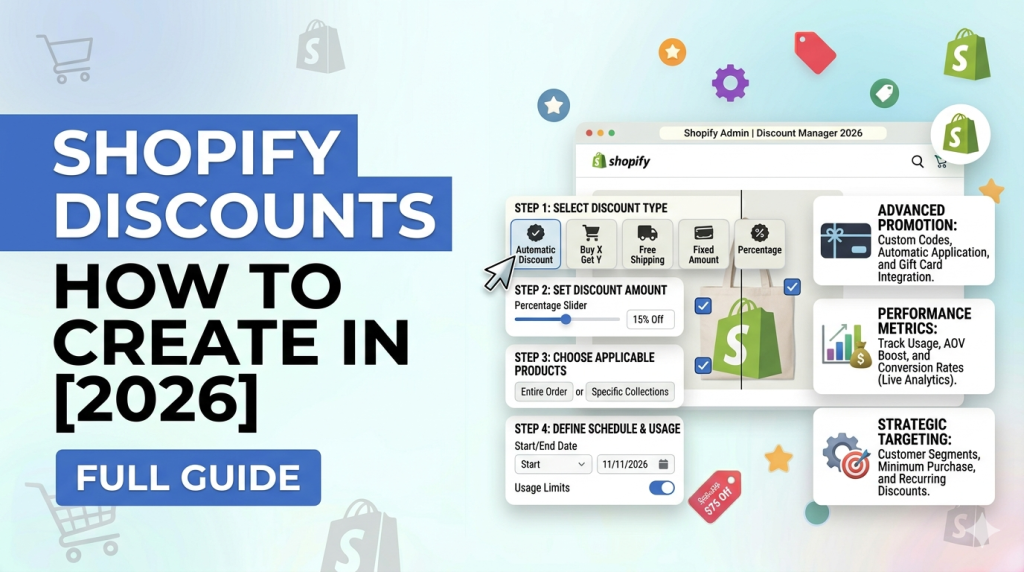
How to Create a Discount Code in Shopify (Step-by-Step)
Creating a discount code in Shopify takes less than five minutes once you know where to look. Here’s exactly how to do it.
Step 1: Access the Discounts Section
- Log in to your Shopify admin panel.
- Click on “Discounts” in the left-hand sidebar.
- Hit the “Create discount” button in the top right corner.
- Choose your discount method: “Discount code” or “Automatic discount.”
Step 2: Choose Your Discount Type
You’ll be prompted to select the type of value you want to offer:
- Percentage – e.g., 15% off
- Fixed amount – e.g., $10 off
- Free shipping – removes shipping costs
- Buy X Get Y – bundle or gift with purchase
Step 3: Configure the Discount Details
This is where most of the customization happens. Let’s break down each field:
- Discount Code Name: Choose something memorable like SUMMER20 or WELCOME10. Shopify also lets you auto-generate a random code.
- Value: Set the percentage or fixed amount you want to discount.
- Applies To: You can apply the discount to all products, specific collections, or individual products. This is super useful for product-level promotions.
- Minimum Requirements: Set a minimum purchase amount or minimum quantity of items. This protects your margins.
- Customer Eligibility: Target all customers, specific customer segments, or customers with specific tags (great for loyalty programs).
- Usage Limits: Control how many times the code can be used in total and per customer.
Active Dates: Schedule your discount to start and end automatically – no manual toggling required.
Step 4: Save and Distribute
Hit Save and your discount code is live. Now you need to get it in front of your customers. Common distribution channels include:
- Email marketing campaigns (Klaviyo, Omnisend, Shopify Email)
- SMS/text message promotions
- Pop-up forms on your storefront
- Social media posts or influencer partnerships
- Post-purchase thank-you flows
How to Create Automatic Discounts in Shopify
Automatic discounts are arguably the most powerful type of discount in Shopify’s toolkit – because they remove friction. No code required. The discount just applies at checkout.
This is perfect for sitewide sales, free shipping thresholds, or BXGY promotions where you want 100% of eligible customers to benefit without any extra steps.
Setting Up an Automatic Discount
- Go to Discounts > Create discount > Automatic discount.
- Select your discount type (percentage, fixed, free shipping, or BXGY).
- Configure your conditions just like you would with a code – minimum order value, eligible products, etc.
- Set your date range and hit Save.
Using Discount Combinations: A 2026 Game-Changer
One of the most significant updates Shopify rolled out recently is the ability to combine discounts. In previous versions, discount stacking was limited and required third-party apps. Now, merchants can configure specific discounts to work together.
When creating or editing a discount, you’ll see a Combinations section that lets you specify whether this discount can be combined with:
- Other product discounts
- Order discounts
- Shipping discounts
This is a nuanced feature. Used thoughtfully, it enables powerful promotional mechanics. For example:
- A loyalty-based product discount + free shipping for VIP customers
- A BXGY offer + a seasonal 10% off order discount
- A welcome code + free shipping for first-time buyers
Shopify Discounts for Specific Scenarios
Not all promotions are created equal. Here’s how to approach some of the most common discount scenarios Shopify merchants face:
Flash Sales and Time-Limited Offers
Flash sales work because of urgency. Use Shopify’s scheduling feature to set precise start and end times. Pair with a countdown timer app (like Countdown Timer Bar) on your storefront to amplify urgency.
- Use a percentage discount for broad appeal
- Apply to a specific collection rather than your entire catalog
- Limit usage to drive exclusivity
First-Time Customer Discounts
Welcome discounts are one of the highest-ROI promotions you can run. The cost is a reduced margin on a first purchase – the benefit is acquiring a new loyal customer.
- Create a code like WELCOME10 and embed it in a pop-up triggered by exit intent
- Set customer eligibility to ‘First-time customers only’
- Combine with an email capture to grow your list simultaneously
Loyalty and VIP Discounts
Rewarding your best customers keeps them coming back. Shopify’s customer tagging system makes this easy – tag high-value customers and restrict certain discounts to those tags.
- Tag customers who spend over $500/year as ‘VIP’
- Create an exclusive 20% off discount restricted to the VIP tag
- Communicate the perk via email to make customers feel valued
Bulk and Wholesale Pricing
If you sell B2B or offer tiered pricing based on quantity, Shopify’s BXGY and minimum quantity conditions are your best friend. For more complex wholesale pricing rules, look at apps like Wholesale Club or Locksmith.
Abandoned Cart Recovery Discounts
Shopify’s built-in abandoned checkout emails allow you to include a discount code in your recovery sequence. Timing matters here – the sweet spot for sending a recovery discount is 1–2 hours after abandonment.
Advanced Shopify Discount Strategies That Actually Work
Now let’s go beyond the basics. These are the discount strategies that experienced Shopify merchants use to grow revenue without destroying margins.
Tiered Discounting (Spend More, Save More)
Tiered discounts incentivize customers to increase their cart size. Example: 10% off $50+, 15% off $100+, 20% off $150+. This significantly increases average order value (AOV).
You can approximate this with Shopify’s native discounts by creating multiple automatic discounts with different minimum order thresholds. For more advanced tiering, apps like Discounted Pricing or Bold Discounts offer greater flexibility.
Referral-Based Discount Codes
Give customers a unique code to share with friends. When the friend uses it, both parties benefit – the new customer gets a deal, the referrer gets credit or a discount on their next order. This turns your existing customers into an acquisition channel.
Seasonal and Calendar-Based Campaigns
Don’t just focus on Black Friday and Cyber Monday. There’s a promotional opportunity on virtually every major shopping date:
| Month | Key Shopping Event | Suggested Discount Type |
| January | New Year / Clearance | Percentage off (end-of-season) |
| February | Valentine’s Day | BXGY or gift bundles |
| March–April | Spring Sales / Easter | Free shipping threshold |
| May | Mother’s Day | Gift guides + fixed amount off |
| July | Mid-Year Sales | Sitewide percentage |
| November | Black Friday / Cyber Monday | Stacked discounts (BXGY + %off) |
| December | Holiday / Christmas | Loyalty + free shipping |
Price Anchoring With Discounts
Show the original price alongside the discounted price. This compare-at-price strategy is built into Shopify – just set the Compare at price field in your product editor alongside the discounted sale price. The psychological impact of seeing a crossed-out higher price is significant in boosting conversions.
Shopify Discount Apps Worth Knowing in 2026
Shopify’s native discount features cover most use cases, but if you need more advanced capabilities, the App Store has excellent solutions:
- Bold Discounts: The most powerful discount scheduling and campaign manager for Shopify. Great for flash sales and catalog-wide promotions.
- Klaviyo: While primarily an email platform, Klaviyo’s discount code integration with Shopify is top-tier for automated, behavior-triggered promotions.
- Loyalty Lion / Smile.io: For building full loyalty programs with points and tiered rewards integrated with Shopify discounts.
- Bundles by Revy: Best for advanced BXGY and bundle discount configurations that go beyond native Shopify capabilities.
- Dexter (Discount Engine): Specifically built for complex, multi-condition discount logic – highly recommended for stores with intricate promotional structures.
Shopify Discounts: Common Mistakes to Avoid
Even experienced merchants make these errors. Don’t let them cost you.
- No expiry dates: Open-ended codes get leaked and shared. Always set an end date.
- Discounting everything all the time: Constant discounts devalue your brand and train customers to wait for sales. Use promotions strategically.
- Ignoring margin impact: Always calculate your actual margin after discount before launching a campaign. A 30% off sale on a product with a 35% margin leaves you almost nothing.
- Not tracking redemptions: Shopify’s Discounts dashboard shows usage data. Check it regularly to understand which offers are working.
- Using discount codes without conditions: Set minimum order values or product requirements to protect profitability.
Frequently Asked Questions About Shopify Discounts
Can I create a discount for a specific customer in Shopify?
Yes. When creating a discount code, set Customer Eligibility to ‘Specific customers’ and search for the customer by name or email. You can also use customer tags to create segment-based discounts.
Can Shopify customers use multiple discount codes?
By default, customers can use one discount code per checkout. However, they can use a discount code alongside an automatic discount if you enable combinations. Multiple discount codes simultaneously require third-party apps.
How do I offer a free product in Shopify?
Use the Buy X Get Y (BXGY) discount type and set the free product at 100% off. Make sure to set a maximum quantity for the free item so customers can’t claim unlimited free products.
Does Shopify charge fees on discount transactions?
Shopify does not charge extra fees specifically for discounted transactions. The standard transaction fee (if not using Shopify Payments) applies to the actual checkout amount paid by the customer.
Can I track which discount codes are performing best?
Absolutely. The Shopify Discounts dashboard shows usage count, total savings applied, and orders generated for each discount. For deeper analytics, Shopify’s reports section (on higher plans) and apps like Klaviyo or Triple Whale provide more detailed attribution.
What’s the difference between a discount and a draft order price adjustment?
A discount is applied during standard checkout and is visible to the customer. A draft order price adjustment is done manually by the merchant in the admin – typically used for custom B2B orders or negotiated pricing. Both affect the final order total but serve different workflows.
| Internal Link Suggestions Consider linking this article to: ‘How to Set Up Shopify Email Marketing’ | ‘Shopify Analytics: Understanding Your Sales Reports’ | ‘How to Create Shopify Collections’ | ‘Best Shopify Apps for Growing Revenue’ | ‘How to Reduce Cart Abandonment on Shopify’ |
| Schema Markup Recommendations Apply the following schema types to this page for enhanced SERP visibility: 1. Article Schema – Mark up the full blog post with author, datePublished, and dateModified fields. 2. FAQPage Schema – Apply to the FAQ section above. Each Q&A pair should be a separate Question/Answer pair in the schema. This enables rich results in Google and increases CTR significantly. 3. HowTo Schema – Apply to the step-by-step sections (Creating a Discount Code, Creating Automatic Discounts). Include estimated time and tool references. This can trigger step-by-step rich results in Google. All schema should be implemented as JSON-LD in the <head> of the page. |
Conclusion: Start Using Shopify Discounts Smarter
Shopify discounts are one of the most powerful conversion tools in your eCommerce arsenal – but only when used strategically. The mechanics are simple. The strategy behind them is what separates stores that thrive from stores that race to the bottom.
To recap the key takeaways from this guide:
- Use discount codes for targeted, trackable promotions with controlled distribution.
- Use automatic discounts for frictionless promotions where you want 100% of eligible shoppers to benefit.
- Leverage discount combinations carefully to create compelling offers without destroying margins.
- Always set expiry dates, minimum requirements, and usage limits on every discount.
- Track performance in your Shopify dashboard and iterate based on what works.
The stores winning in 2026 aren’t the ones discounting the most – they’re the ones discounting the smartest. Now you have the playbook. Go put it to work.
Have a specific discount scenario you’re trying to figure out? Drop your question in the comments and let’s solve it together.