

Last updated: November 23, 2026. Shopify settings come from the Shopify Help Center, and app plans from the Shopify App Store, checked on November 23, 2026. Disclosure: Webiots builds Ultimate Product Options, one of the methods below. This guide is not legal advice on product safety labeling.
Quick answer: To sell candles on Shopify with scent, size and custom label options, add Scent and Size as variants in Products > your candle > Variants > Add options, so each scent and size has its own price, SKU and stock. Then add the label message as a text field, either with a little theme code (free, but no extra charge) or with a product options app, which can also charge extra for the personalized label, a photo or a gift box. Show burn time and scent notes on the page, add the safety warnings your market requires, and pack glass jars for heat and breakage.
Key takeaways:
- Variants for stocked choices (scent, size), a text field for the message.
- Shopify allows 3 options per product, so plan them before you start.
- Charging extra for a custom label needs an app or a separate variant.
- Show burn time and scent notes, not just a size.
In this guide
- Types of candles to sell
- The options a candle product needs
- Recommended setup: what goes where
- Step 1: Add scent and size variants
- Step 2: Add a custom label field (3 ways)
- What the finished product page looks like
- How to price candle options
- What makes a candle product page sell
- Safety labels and rules
- Shipping candles safely
- Make candles yourself or print on demand
- Common mistakes
- FAQ
What Types of Candles Can You Sell on Shopify?
| Candle type | Who buys it | Options it needs |
|---|---|---|
| Scented jar candles | Home decor shoppers, repeat buyers | Scent, size, vessel |
| Personalized label candles | Gift buyers, birthdays, memorials | Label text, occasion, photo upload, scent, gift box |
| Wedding and event favors | Couples, planners, companies | Names, date, quantity, label color |
| Pillar, taper and shaped candles | Decor and table settings | Color, height, pack size |
| Gift sets and subscriptions | Gift buyers, loyal customers | Pick your scents, delivery frequency, gift message |
Which Options Does a Candle Product Need?
| Option | Best field type | Price effect | Tip |
|---|---|---|---|
| Scent | Image swatches or dropdown | Usually included; extra for premium oils | Add top, middle and base notes to each choice |
| Size | Buttons | Biggest price driver | Show weight and burn time, such as 8 oz, about 45 hours |
| Wax | Swatches | Extra for beeswax or coconut blends | Say what each wax means: clean burn, vegan, stronger scent |
| Vessel | Image swatches | Extra for ceramic or reusable jars | Photograph every vessel in the same light |
| Wick | Radio buttons | Small extra for wooden wicks | Mention the crackle of a wooden wick |
| Custom label text | Text field with a character limit | Add-on price | Limit characters to what fits on the label, such as 30 |
| Occasion | Dropdown | Usually included | Birthday, wedding, anniversary, memorial, thank you |
| Photo or logo for the label | File upload | Add-on price | Ask for a sharp image and say which file types you accept |
| Gift box and gift message | Checkbox plus text area | Add-on price for the box | Show the message field only when the box is ticked |
Recommended Setup: Which Candle Options Go Where?
Shopify allows 3 options per product, and every combination becomes a variant with its own price and stock. Use those 3 slots for choices you stock, and put everything typed or made to order in product options.
| Choice | Set up as | Why |
|---|---|---|
| Scent | Variant (option 1) | You pour and stock each scent |
| Size | Variant (option 2) | Each size has its own price and stock |
| Label type: Standard or Personalized | Variant (option 3), if you don’t use an app | The free way to charge more for a personalized label |
| Label message, occasion | Text field and dropdown | Typed by the customer, saved on the order |
| Photo, gift box, wax and wick upgrades | Product options app with add-on prices | Variants can’t take uploads, and you’re out of option slots |
Illustrative example: 12 scents x 3 sizes x 2 label types is 72 variants to manage. If you pour to order, moving scent to a product option cuts that to 6 variants and frees a slot. See how to add more than 3 options to a Shopify product.
Step 1: How Do You Add Scent and Size Options on Shopify?
Add them as variants in the product’s Variants section. Per the Shopify Help Center:
- In your Shopify admin, go to Products and open your candle (or click Add product).
- Scroll to Variants and click Add options like size or color.
- Type Scent as the option name and add values such as Vanilla, Lavender, Rose and Sandalwood. Click Done.
- Click Add another option, type Size, and add values such as 100 g, 200 g and 300 g. Click Done.
- Shopify creates every scent and size combination. Click a variant, or group them by size, to set each price, SKU and stock, such as 100 g $15, 200 g $25, 300 g $35.
- Add a photo to each variant so the image changes when a shopper picks a scent or size.
- Click Save, then check the product page on your phone.
Tip: put burn time in the size value, such as 200 g (about 40 hours), so shoppers compare sizes by value, not just weight.
Step 2: How Do You Add a Custom Label to a Shopify Candle? 3 Ways
| Method | Cost | Extra charge for label? | Photo upload? | Best for |
|---|---|---|---|---|
| A. Label type variant only | Free | Yes, via the variant price | No | Collecting the message by email after the order |
| B. Text field in theme code | Free | Only combined with method A | No | One simple message field |
| C. Product options app | Free plans available | Yes, as an add-on price | Yes, on most apps | Labels, photos, gift boxes and more |
Method A: Add a Label type variant
Add a third option, Label, with the values Standard and Personalized, and price Personalized higher, such as +$5. It’s free, but there’s no box for the message, so you’ll need to ask for it by email or in the order note.
Method B: Add a text field with theme code
Shopify can save extra fields on an order as line item properties. In the theme editor, add a Custom Liquid block to the product page with a text input named, for example, properties[Label message] and a 30-character limit. The message then appears on the order. It’s free, but it can’t charge extra on its own, can’t take photos, and shows on every product that uses the template. See how to add a custom text field to Shopify product pages for the full steps and code.
Method C: Use a product options app
An app adds the label field, occasion dropdown, photo upload and gift box without code, and can charge for each. These steps use Ultimate Product Options: text fields, dropdowns, swatches and add-on prices are on its free plan; file uploads and conditional logic are on the Basic plan ($7.99 a month); a live text preview on the product image is on the Advanced plan ($12.99 a month).
- Install the app and create an option set, such as Candle Options.
- Add a Personalize the label checkbox with its add-on price, such as +$5.
- Add a text field called Your label message, with placeholder text such as Enter a name or message and a 30-character limit, shown only when Personalize is ticked.
- Add an Occasion dropdown and, if you print photos, a photo upload.
- Add a gift box checkbox with a price and a gift message field that appears when it’s ticked. See how to add a gift wrap option.
- Make the label message required once Personalize is ticked. See how to make options required.
- Assign the option set to every candle, then place a test order and check the message, occasion and photo appear on the order and packing slip.
Other product options apps, such as Globo, Easify and Hulk, also add text fields and add-on prices. We compare them in the best Shopify product options apps.
What Does the Finished Candle Product Page Look Like?
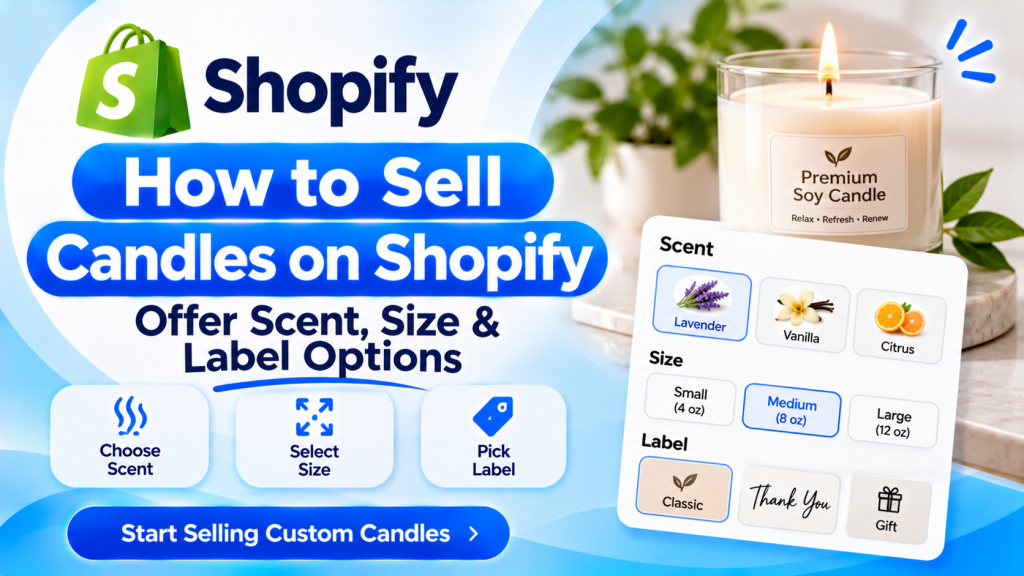
Personalized Soy Candle · from $15
1. Choose your scent: Vanilla · Lavender · Rose · Sandalwood
2. Choose your size: 100 g (about 20 hours) $15 · 200 g (about 40 hours) $25 · 300 g (about 60 hours) $35
3. Personalize your label (+$5): [ Your message ] 0/30 characters · Occasion: Birthday
4. Add a gift box (+$4): [ ] Yes, with a gift message
Illustrative layout with assumed prices and burn times. Scent and size are variants; the label, occasion and gift box are product options.
How Should You Price Candle Options?
Set the price of the base candle, then add a fixed amount for each upgrade. Check the most expensive combination as well as the cheapest, so wax, vessel and label upgrades all cover their own cost.
Illustrative example with assumed prices. A soy candle in an amber glass jar starts at $24 for the 8 oz size.
| Choice | Price |
|---|---|
| 8 oz soy, amber glass (base) | $24 |
| 12 oz size | +$8 |
| Coconut-soy wax | +$4 |
| Ceramic vessel | +$10 |
| Wooden wick | +$2 |
| Custom label text | +$6 |
| Gift box with message | +$5 |
| 12 oz coconut-soy, ceramic, wooden wick, custom label, gift box | $24 + $8 + $4 + $10 + $2 + $6 + $5 = $59 |
For favors and corporate gifts, add quantity discounts, such as 10% off 12 or more. See how to set up quantity breaks on Shopify.
What Makes a Candle Product Page Sell?
- Describe the scent in notes: top, middle and base, plus a mood, such as Cozy evening by the fire.
- Show burn time for every size.
- Photograph the candle lit and unlit, and in a room, so shoppers see the size. See how to keep product photos consistent.
- Show a label preview so gift buyers see their message before they pay.
- Explain the wax and wick in plain words.
- Add care tips: trim the wick, burn until the top melts evenly, never leave a candle unattended.
- Show reviews with photos, especially for scent, which shoppers can’t smell online.
- Offer a sample or discovery set so new customers can try several scents.
What Safety Labels Do Candles Need?
Candles usually need fire safety warnings, and scented candles may need extra hazard labels for their fragrance, depending on where you sell. In the US, many sellers follow the ASTM F2058 candle fire safety labeling standard. In the EU and UK, fragrance ingredients in scented candles can require hazard labeling under classification rules. Ask your fragrance supplier for safety data, and check the rules in each market you ship to.
Leave room for the warnings on personalized labels, and put them on the product page too, for example: Never leave a burning candle unattended, keep away from children and pets, and burn on a heat-resistant surface.
How Do You Ship Candles Safely?
- Use a separate shipping profile for heavy jars and gift sets, so rates cover the real weight.
- Wrap glass jars in bubble wrap or molded inserts, with padding on every side.
- Plan for heat: soft waxes can melt in hot vans in summer. Add a note, choose faster shipping, or pause shipping to very hot regions.
- Put the lid on and seal the top, so scent and dust stay out.
- Show delivery time as production plus shipping for personalized candles, and publish a holiday cutoff. See holiday order cutoffs for personalized products.
Should You Make Candles Yourself or Use Print on Demand?
| Make in-house | Print on demand | |
|---|---|---|
| Upfront cost | Wax, oils, jars and tools | Low; you pay per order |
| Scents and options | Any you can make | The supplier’s range only |
| Margin | Higher once you sell volume | Lower per candle |
| Personalization | Anything, with a product options app | Mainly label artwork |
| Shipping | You pack and ship | The supplier ships |
Shopify’s guide to print-on-demand candles lists suppliers such as Printful, Printify and Gooten that connect to Shopify. Many brands start with print on demand to test designs, then move best sellers in-house.
Common Candle Store Mistakes
- Too many scents at launch. Start with 6 to 10 strong sellers and add seasonal ones.
- Using all 3 variant slots on scent, size and vessel, leaving no room for a label type.
- No character limit on the label, so long messages don’t fit.
- No burn time or scent notes, so shoppers can’t compare.
- Underpricing upgrades, such as ceramic jars that cost far more than glass.
- Weak packaging, leading to broken jars and refunds.
- Missing safety warnings on the candle or the page.
Frequently Asked Questions
How do I add scent and size options to a candle on Shopify?
Open the product, go to Variants, click Add options like size or color, and add Scent and Size with their values. Shopify creates each combination so you can set its price, SKU and stock.
How do I let customers personalize a candle label on Shopify?
Add a text field with a character limit, either with a Custom Liquid block in your theme or a product options app. The message is saved on the order for production.
Can I add a custom label without an app?
Yes. Add a Label type variant (Standard or Personalized) to charge for it, and a text field in theme code to collect the message. You’ll need an app for photo uploads or add-on prices without extra variants.
How many options can a Shopify candle product have?
Shopify allows 3 options per product, such as scent, size and label type. A product options app adds more, such as occasion, photo upload, gift box, wax and wick, without creating variants.
How do I charge more for bigger candles or a personalized label?
Set size as a variant with its own price. For the label, use a Personalized variant with a higher price, or an add-on price in a product options app.
Do candles need warning labels?
Usually yes. Many US sellers follow ASTM F2058 for fire safety labels, and scented candles in the EU and UK may need fragrance hazard labels. Check the rules for each market you sell in.
How do I ship candles without them melting or breaking?
Pad glass on every side, seal the lid, use a separate shipping profile for heavy items, and choose faster shipping or add a note during hot weather.
Related Reading
- How to Add a Custom Text Field to Shopify Product Pages
- How to Sell Custom Signs on Shopify
- Shopify Gift Options in the Cart
- How to Charge Extra for Product Options on Shopify
Update Log
November 23, 2026: First published with candle types, an options table, a recommended setup, step-by-step variant setup, 3 ways to add a custom label, a product page example, pricing, safety labels, shipping and print on demand.