

Last updated: November 9, 2026. Based on Shopify’s Help Center and B2B documentation, checked on November 9, 2026. Disclosure: Webiots builds Shopify apps. No apps in this guide paid to be included.
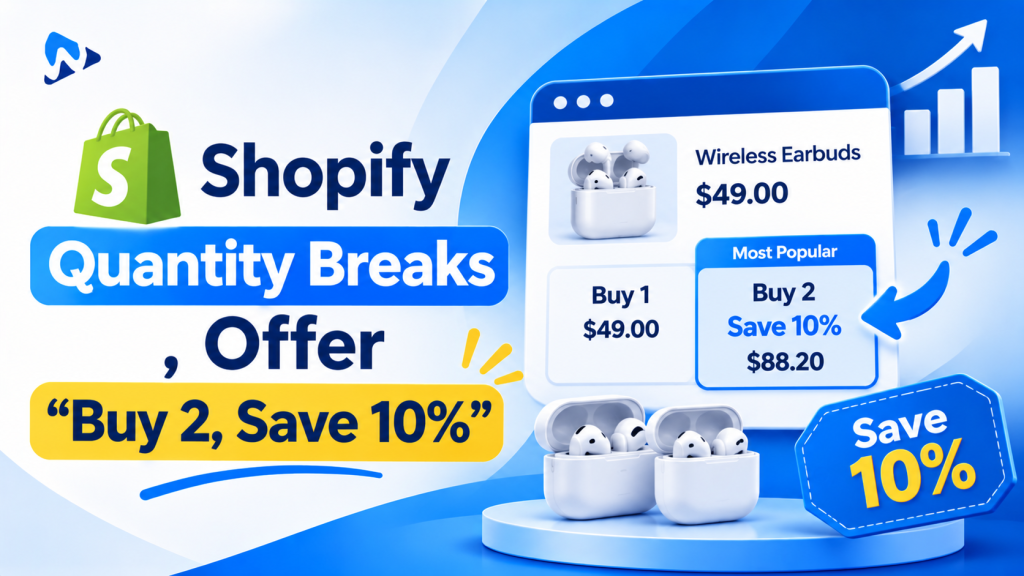
Quick answer: Quantity breaks (also called volume discounts or tiered pricing) give shoppers a lower price when they buy more, such as "buy 2, save 10%; buy 3, save 15%". On Shopify you can create one tier at a time with an "Amount off products" discount and a minimum quantity, and B2B stores can set quantity price breaks in B2B catalogs. For several tiers shown as clickable options on the product page, which is how most stores sell multi-buys, you need a quantity breaks app.
Key takeaways:
- One tier is possible with Shopify discounts.
- Several tiers on the product page need an app.
- Price tiers so the bigger pack is the obvious pick.
In this guide
- What quantity breaks are
- Quantity breaks without an app
- Quantity price breaks for B2B
- Quantity breaks with an app
- How to price your tiers
- How to show tiers on the product page
- The bottom line
- FAQ
What Are Quantity Breaks on Shopify?
A lower price per item when the customer buys more of the same product. They work best for products people use up or buy for others: supplements, coffee, skincare, socks, phone accessories and gifts.
| Quantity | Discount | Price per item ($30 product) | Total |
|---|---|---|---|
| 1 | None | $30.00 | $30.00 |
| 2 | 10% off | $27.00 | $54.00 |
| 3 | 15% off | $25.50 | $76.50 |
| 5 | 20% off | $24.00 | $120.00 |
How Do You Create Quantity Breaks on Shopify Without an App?
With an "Amount off products" discount and a minimum quantity, one tier per discount.
- Go to Discounts > Create discount > Amount off products.
- Choose Automatic discount, so no code is needed, and give it a title such as "Buy 3, save 15%".
- Set the value, for example 15%, and select the products or collections.
- Under Minimum purchase requirements, choose Minimum quantity of items and enter 3.
- Set combinations, eligibility and dates, then save and test.
For a second tier, such as "buy 2, save 10%", create another discount. With several tiers, check that the right one applies at each quantity, as product discounts that don’t combine don’t stack, and test every tier in the cart.
| Native discounts can | Native discounts can’t |
|---|---|
| Give a discount from a minimum quantity | Show tiers as options on the product page |
| Apply automatically in the cart and checkout | Let shoppers pick "Buy 2" or "Buy 3" with one click |
| Target products, collections, customer segments or markets | Show "Most popular" or "Best value" labels |
| Run on POS Pro locations | Mix variants across a tier easily, such as 3 different colours |
Can B2B Stores Use Quantity Price Breaks?
Yes, for wholesale customers. Shopify B2B catalogs support volume pricing, also called quantity price breaks, for company customers. According to Shopify partner guides, B2B became available on Basic, Grow and Advanced plans as well as Plus on April 2, 2026, with up to three B2B catalogs on plans below Plus. These prices apply only to B2B customers, not to regular shoppers.
How Do Quantity Breaks Apps Work?
They add a tier picker to the product page and apply the discount in the cart. Most apps:
- Show tiers as selectable boxes ("1 pack", "2 pack, save 10%", "3 pack, save 15%")
- Highlight a tier with labels such as "Most popular" or "Best value"
- Show the price per item and the total saving
- Let shoppers choose different variants in one tier, such as three colours
- Add a free gift or free shipping to the highest tier
- Apply the discount through Shopify Functions, so it works with Shopify checkout
When comparing apps, check the starting price, whether the widget is a theme app block, how it looks on mobile, whether it works with your other discounts, and whether it also does BOGO and bundles so you don’t need several apps.
How Should You Price Quantity Break Tiers?
- Keep it to 3 tiers. 1, 2 and 3 (or 1, 3 and 6) are easy to compare.
- Make the middle tier the obvious choice. Label it "Most popular" and give it a clear saving.
- Check your margin at the top tier. With a $30 product costing $9, 20% off five units still leaves $75 profit before shipping, against $21 for one.
- Use real savings. Show the saving in money ("Save $13.50"), not just a percentage.
- Match how people use the product. For consumables, tiers like 1, 2 or 3 months’ supply feel natural.
How Should Quantity Breaks Look on the Product Page?
Place the tier picker right above the Add to cart button. Show each tier as a box with the quantity, total price, price per item and saving. Preselect the most popular tier, keep text short for mobile, and make sure the selected tier carries through to the cart. Test on your phone before you launch.
Quantity breaks also work well alongside other offers. See how to set up BOGO on Shopify and how to create product bundles on Shopify.
The Bottom Line
If you only need one simple tier, a Shopify "Amount off products" discount with a minimum quantity works and costs nothing. Wholesale stores can use quantity price breaks in Shopify B2B catalogs. For several tiers that shoppers can pick on the product page, with labels and savings shown, use a quantity breaks app, and price the tiers so the middle option is the obvious choice.
Frequently Asked Questions
Does Shopify have quantity breaks built in?
Partly. An "Amount off products" discount with a minimum quantity gives one tier, and B2B catalogs support quantity price breaks for wholesale customers. Tiered offers shown on the product page need an app.
What’s the difference between quantity breaks and bundles?
Quantity breaks discount more units of the same product. Bundles combine different products, such as a cleanser, toner and moisturizer.
Can I offer free shipping on the top tier?
Yes. Create a free shipping discount with a minimum quantity, or use an app that adds free shipping or a gift to a tier.
Do quantity breaks work with other discounts?
They can. Choose which discount classes they combine with, and test them with any sitewide sale before busy periods like Black Friday.
How many tiers should I offer?
Three is usually enough. More tiers make the choice harder and the widget longer on mobile.
Related Reading
- How to Create Product Bundles on Shopify (2026 Guide)
- How to Set Up BOGO on Shopify (2026)
- Black Friday Promotion Ideas for Shopify Stores
Update Log
November 9, 2026: First published, based on Shopify’s Help Center and B2B documentation.