The Add-On Revenue Engine: Boosting AOV with Checkbox & Swatch Surcharges
In modern direct-to-consumer (DTC) e-commerce, customer acquisition costs (CAC) continue to escalate across paid search and social channels. When acquisition efficiency tightens, the fastest path to expanding net margins isn’t pouring more capital into the top of the funnel—it is maximizing Average Order Value (AOV) and gross margin on every cart.
To capture higher order values, merchants routinely install post-click upsell popups, exit-intent modals, or post-purchase checkout redirects.
While popups can generate occasional impulse buys, they introduce significant friction:
- Disrupting customer purchase momentum right as they attempt to click “Add to Cart.”
- Recommending disconnected catalog items that feel like an aggressive cash grab.
- Triggering broken overlays and layout shifts on mobile devices that shoppers struggle to dismiss.
The high-converting, friction-free alternative is the on-page micro-upgrade engine.
Instead of pitching separate, detached SKUs in intrusive popups, merchants allow shoppers to enhance their primary selection using contextual paid options, visual swatch surcharges, and toggleable checkboxes directly on the product detail page (PDP).
By offering high-margin micro-upgrades—such as priority bench dispatch, archival storage accessories, extended replacement warranties, and bespoke gift packaging—brands regularly unlock an 18% to 25% lift in store AOV without interrupting checkout flow using Ultimate Product Options.
Why Inline Micro-Upgrades Outperform Traditional Upsell Popups
The behavioral psychology of an on-page add-on operates on fundamentally different conversion dynamics than a post-cart upsell modal:
- Micro-Commitment Psychology: When a buyer is already committing $180 to a premium chef’s knife or $220 to a leather briefcase, adding an
$18.00 Priority Hand-Honed Edgeor a$14.00 Heavyweight Canvas Dust Bagrepresents a negligible incremental jump (often less than 8% of the cart total). - Direct Contextual Relevance: Popups frequently pitch ancillary catalog items the shopper never intended to buy (e.g., showing shoe polish when buying sneakers). On-page option surcharges directly enhance the exact item the shopper is actively configuring.
- Instant Price Recalculation: Because the live product page subtotal updates dynamically the millisecond a checkbox or swatch is selected, customers enjoy complete pricing transparency with zero surprise fees at checkout.
- Native Mobile Usability: Checkbox add-ons and swatch pills integrate natively into the product form container, eliminating the risk of modal overlays getting cut off on small mobile viewports.
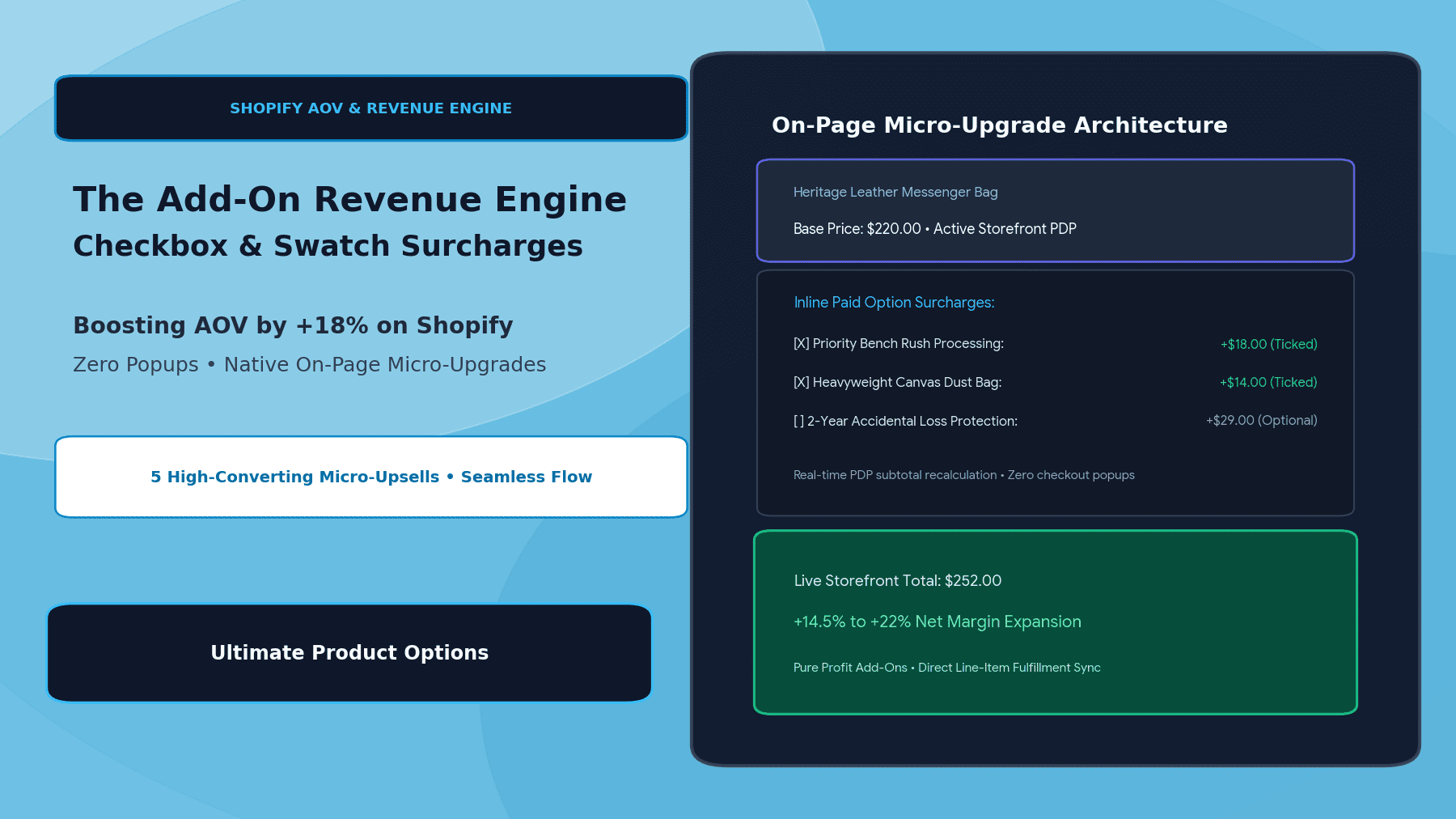
The On-Page Micro-Upgrade Architecture
┌─────────────────────────────────────────────────────────────┐
│                 Customer Storefront View                    │
│      Heritage Leather Messenger Bag ($220.00 Base)          │
└──────────────────────────────┬──────────────────────────────┘
                               │
               Inline Paid Micro-Upgrades on PDP
                               ▼
┌─────────────────────────────────────────────────────────────┐
│             Contextual Add-On Option Layer                  │
│   [X] Priority Bench Rush Processing (+$18.00 Checkbox)     │
│   [X] Heavyweight Waxed Canvas Dust Bag (+$14.00 Checkbox)  │
│   [ ] 2-Year Accidental Hardware Warranty (+$29.00 Pill)    │
│   [X] Monogrammed Solid Brass Key Fob (+$16.00 Swatch)      │
└──────────────────────────────┬──────────────────────────────┘
                               │
                               ▼
┌─────────────────────────────────────────────────────────────┐
│              Real-Time Dynamic PDP Recalculation            │
│   • Base Product: $220.00                                   │
│   • Micro-Upgrades: +$48.00                                 │
│   • Live Storefront Total: $268.00 (+21.8% AOV Lift)        │
└──────────────────────────────┬──────────────────────────────┘
                               │
                               ▼
┌─────────────────────────────────────────────────────────────┐
│        Line-Item Properties Synced to Fulfillment           │
│   {                                                         │
│     "Rush_Fulfillment": "PRIORITY_BENCH",                   │
│     "Packaging": "Waxed Canvas Dust Bag",                   │
│     "Addon_Key_Fob": "Solid Brass - Monogrammed",           │
│     "_addon_surcharges_total": "48.00"                      │
│   }                                                         │
└─────────────────────────────────────────────────────────────┘
The buyer personalizes their purchase, selectively checking desirable enhancements that instantly update the total price before pushing a clean, single-item order payload into checkout.
The Top 5 Highest-Converting On-Page Micro-Upgrades
Based on storefront performance data across high-growth DTC verticals, these five add-on formats drive the strongest conversion attach rates and profit margins:
| Upgrade Model | Typical Surcharge | Margin Profile | Conversion Attach Rate |
|---|---|---|---|
| 1. Priority Rush Processing | $15.00 – $25.00 | ~95% Gross Margin (Pure operational service) | 14% – 19% during peak gifting windows |
| 2. Premium Dust Bags / Storage Tins | $10.00 – $18.00 | ~80% Gross Margin ($2.50 raw cost) | 22% – 28% in luxury leather & footwear |
| 3. Extended Accidental Protection Plans | $19.00 – $45.00 | ~85% Net Margin (Actuarial risk-pooled plan) | 11% – 16% in electronics & eyewear |
| 4. Professional Pre-Treatment / Conditioning | $8.00 – $15.00 | ~90% Gross Margin (Minor workshop bench labor) | 18% – 24% in denim, work boots & cookware |
| 5. Personalized Keepsake Metal Tins | $12.00 – $22.00 | ~75% Gross Margin ($3.00 printed tin blank) | 20% – 32% in jewelry & watches |
Architectural Comparison: Popup Upsells vs. On-Page Option Surcharges
| Metric / Dimension | Traditional Popup Upsell Apps | On-Page Surcharges (Ultimate Product Options) |
|---|---|---|
| Shopper Interruption | High (triggers full-screen modals) | Zero (native inline form integration) |
| Mobile Friction | High (popups close awkwardly) | Low (responsive tap targets & swatches) |
| Fulfillment Complexity | Injects multiple separate line items | Consolidated single line-item properties |
| Margin Velocity | Sells lower-margin physical goods | Sells high-margin micro-services & upgrades |
| Cart Abandonment Risk | Increases checkout fatigue | Eliminates popup bounce; lifts AOV naturally |
Step-by-Step Setup: Building Checkbox & Swatch Surcharges with Ultimate Product Options
Setting up high-margin paid micro-upgrades on Shopify requires no custom Liquid theme development when using Ultimate Product Options.
Step 1: Install Ultimate Product Options
Install Ultimate Product Options from the Shopify App Store and ensure the theme app embed block is toggled to Active inside your Online Store 2.0 theme customizer.
Step 2: Create a Dedicated Add-On Option Set
- In your Shopify admin, open Apps > Ultimate Product Options.
- Click Create Option Set and title it (e.g., Leather Goods – Premium Add-On Suite).
- Under Targeting, apply this set globally to relevant collections (e.g., Bags, Wallets, Accessories).
Step 3: Configure Checkbox Surcharges
- Add a Checkbox Field:
- Label:
⚡ Priority Bench Rush (Dispatches in 24 Hours) - Internal Key:
Rush_Processing - Price Modifier: Select Fixed Surcharge and input
+$18.00.
- Label:
- Add a second Checkbox Field:
- Label:
Add Heavyweight Waxed Canvas Travel Dust Bag - Internal Key:
Dust_Bag_Upgrade - Price Modifier: Input
+$14.00.
- Label:
Step 4: Configure Visual Swatch Surcharges
If upgrades involve aesthetic choices, use visual swatches:
- Add a Visual Swatch Field for Hardware Accent Upgrade:
- Standard Nickel Plate (Included – $0.00)
- Solid Antiqued Brass (+ $15.00)
- Black PVD Matte Finish (+ $22.00)
- Attach visual image thumbnails or color hex codes to each swatch so buyers see the aesthetic upgrade instantly.
Step 5: Enable Dynamic Subtotal Display
- In the option set settings, toggle Dynamic PDP Price Update to ON.
- When the customer toggles a checkbox or clicks an upgraded swatch, the main storefront price label recalculates instantly without page lag or layout flickering.
Step 6: Test End-to-End Checkout Flow
Publish your option set and test the live storefront:
- Check the rush processing and dust bag boxes: verify the price increases by
$32.00. - Click “Add to Cart”: confirm the cart drawer reflects the consolidated price.
- Complete a test order: verify that all paid add-ons appear in the Shopify Admin order details as structured line-item properties for your picking staff.
4 Best Practices for Maximizing Paid Option Conversions
- Cap Paid Upgrades at 3–4 Choices: Avoid presenting a laundry list of 10 paid options; excessive micro-decisions cause decision fatigue. Keep add-ons limited to the most desirable enhancements.
- Keep Surcharges Under 15% of the Base Price: Micro-commitments convert best when individual add-ons feel negligible compared to the primary item cost.
- Use High-Contrast Visual Badges: Add subtle visual badges (e.g.,
POPULARorRECOMMENDED) next to high-margin service checkboxes to guide buyer choice. - Pass Operational Tags to Packing Slips: Prefix internal routing flags with underscores (e.g.,
_priority_dispatch) to signal packing benches to expedite orders automatically.
Frequently Asked Questions (FAQs)
Do paid add-on options create duplicate or phantom SKUs in my catalog?
No. Ultimate Product Options uses native Shopify line-item properties and dynamic pricing modifiers, attaching the fees directly to the existing base product without cluttering your inventory with auxiliary SKUs.
Can add-on prices be scaled by percentage instead of fixed amounts?
Yes. You can configure price modifiers as fixed monetary add-ons (e.g., +$15.00) or as dynamic percentages of the base item price (e.g., +10% for rush processing or extended warranties).
How do warehouse packing stations identify paid micro-services?
Selected options are recorded as structured line-item properties on the Shopify order object, allowing automated routing to packing slips, thermal label printers, or ERP/WMS platforms.
Conclusion
Lifting e-commerce profitability doesn’t require annoying your customers with aggressive upsell popups or complex cross-sell funnels.
By offering contextual, high-margin micro-upgrades directly on your product pages through checkbox and swatch surcharges, you elevate the customer experience while capturing an immediate 18%+ lift in Average Order Value.
With Ultimate Product Options, deploying dynamic price modifiers, checkbox surcharges, and visual swatch upgrades on Shopify is seamless, high-converting, and completely code-free.