Last updated: October 30, 2026. Disclosure: Webiots develops Ultimate Product Options, the app used in the setup steps.
Quick answer: A product options app usually fails to show options across all products due to missing theme app embeds, unassigned option rules, draft product statuses, or conflicting DOM selectors. Checking automated collection conditions, verifying app embed activation, and syncing assigned products ensures your custom fields render across your entire catalog without modifying theme template code.
Key takeaways:
- Theme app embeds must be turned on in Online Store 2.0 to inject option fields.
- Option set assignment rules determine which individual items or collections display custom inputs.
- Draft products, custom alternate templates, or browser caching can prevent options from rendering.
When merchants install a customization tool, discovering that their Shopify product options app not showing all products is a common troubleshooting issue. It disrupts sales, delays product launches, and creates confusion for buyers expecting personalizations. Diagnosing the root cause quickly restores custom swatches, text inputs, and file upload fields across your catalog.
In this guide:
- Why is your Shopify product options app not showing all products?
- How do theme app embeds control option visibility?
- How do the most common option display errors compare?
- How do collection conditions and product templates cause missing options?
- How do you fix missing product options using Ultimate Product Options?
- The Bottom Line
- Frequently Asked Questions
- Related Reading
- Update Log
- Sources
Why is your Shopify product options app not showing all products?
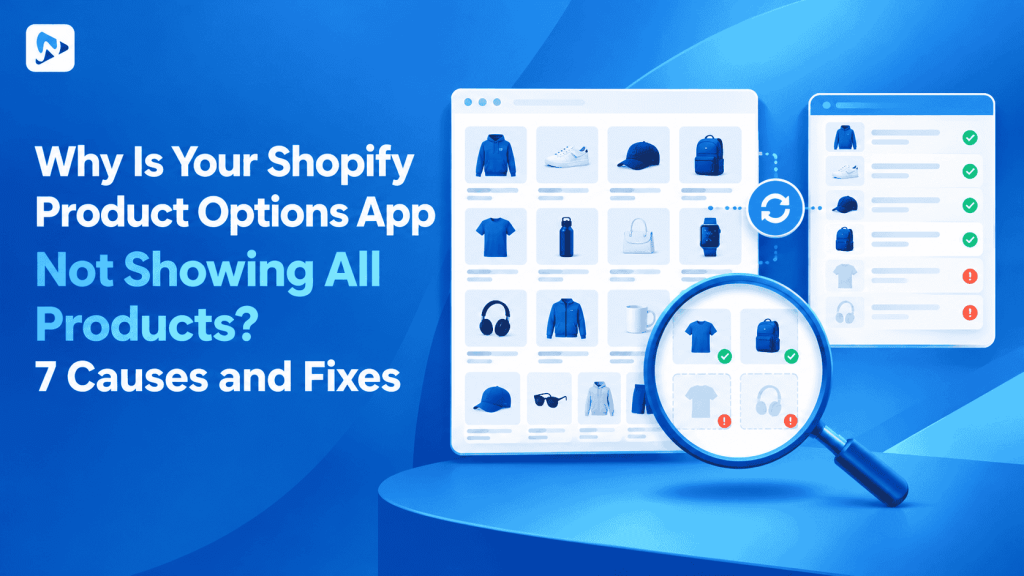
Missing options are usually caused by inactive app embeds, unassigned product rules, draft catalog statuses, or custom theme template conflicts. Shopify natively supports up to 3 option names and up to 2,048 variants per product. Because third-party options apps use line item properties to display virtual fields beyond native limits, they depend on specific JavaScript hooks inside your theme.
The 7 primary reasons why options fail to appear across all items include:
- Theme App Embed Disabled: The app embed block in your live Online Store 2.0 theme is toggled off.
- Specific Assignment Rules: The option set is assigned to specific products or tags rather than “All Products”.
- Automated Collection Desynchronization: Products added recently have not met the automated collection tag conditions.
- Draft or Archived Status: According to Shopify Help Center product status guides, products set to draft or archived do not render live frontend apps.
- Alternate Product Templates: The missing items use custom JSON templates lacking the main product form block.
- Third-Party Script Conflicts: Page builders, quick-view popups, or minified scripts block DOM injection.
- Aggressive Browser or CDN Caching: Old storefront assets remain cached after publishing new option rules.
Tip: Always test missing option fields in an incognito or private browsing window. This bypasses local browser cache and confirms whether new settings have deployed live.
How do theme app embeds control option visibility?
Theme app embeds inject necessary frontend scripts into your store head without permanently modifying your underlying Liquid files. In Shopify’s Theme App Extensions framework, apps inject blocks directly into the theme customizer. If a merchant switches active themes or forgets to activate the embed during setup, the app cannot locate the product form.
When the embed is turned off, the app’s script never loads, leaving the product page with only its native variant selectors. Activating the embed activates the scripts across all active product templates simultaneously.
How do the most common option display errors compare?
Diagnosing missing options depends on whether the issue affects your entire storefront or only selected items. The table below outlines how to identify the failure point based on storefront symptoms.
| Symptom | Likely Root Cause | Scope of Failure | Resolution Action |
|---|---|---|---|
| No options appear anywhere | App embed is toggled off | Entire storefront | Toggle app embed on in theme editor |
| Options missing on new items | Option set missing collection/tag | Specific products | Add target tag or assign to All Products |
| Options missing in Quick View | AJAX modal lacks embed hook | Collection popup view | Set app target to main product pages |
| Options disappear on mobile | Sticky cart or theme CSS hide | Mobile viewport only | Adjust responsive option container rules |
How do collection conditions and product templates cause missing options?
Option rules assigned to dynamic collections fail when product tags or vendors do not match rule filters exactly. In many catalog configurations, merchants assign an option set to an automated collection such as “Custom Apparel”. If a newly published product lacks the required tag (e.g., customizable), Shopify excludes it from that collection, and the app never triggers its fields.
Additionally, some stores use custom alternate product templates created by page builder tools. According to Shopify Theme Architecture documentation, if an alternate template omits standard form markup ({% form 'product' %}), the app extension cannot find the container to mount option inputs. Reverting to the default product template or adding the app block resolves the issue.
How do you fix missing product options using Ultimate Product Options?
You can fix missing options by validating theme app embed activation, confirming target product assignments, and republishing your option sets. The following steps ensure your custom fields render across all intended inventory.
- Open your Shopify Admin and navigate to Online Store > Themes.
- Click Customize next to your live theme, select App embeds from the left sidebar, and verify that Ultimate Product Options is switched to On, then save.
- Open Apps > Ultimate Product Options from your Shopify admin.
- Click on your active Option Set to open its settings.
- Review the Target Products section. If you want options to show everywhere, change the target rule to All Products rather than manual selection.
- If targeting by automated collection, confirm that the missing products actively contain the matching tags or conditions in your Shopify Products menu.
- Check your conditional logic rules (available on the Basic plan at $7.99/month and above) to ensure options are not hidden by default conditions.
- Click Save & Publish to force a cache refresh across the app servers.
- Open an incognito browser window, visit the previously affected product page, select an option, and complete a test add-to-cart action to confirm the properties appear in your cart drawer.
Reliable Product Options for Your Entire Catalog
Deploy swatches, text fields, and file upload options with zero theme code modifications. Free plan available.
The Bottom Line
When custom options fail to show on all products, the issue is almost always tied to theme embed activation, unassigned collection rules, or product status configurations. By verifying that your Online Store 2.0 app embed is active and ensuring option assignment rules encompass your entire catalog, you can guarantee that customers see customization fields on every relevant item.
Want to try it on your own products? Install Ultimate Product Options free or learn more about the app.
Frequently Asked Questions
Why do my custom product options show in theme customizer preview but not live?
This occurs when the theme customizer preview has the app embed enabled, but changes have not been published to your live published theme. Ensure the embed toggle is saved and published on your primary live storefront.
Do I need to edit theme code if my options app is not displaying?
No, modern Online Store 2.0 apps use theme app embeds that operate without manual Liquid edits. If an app fails to load, toggling the embed or checking target product assignments resolves the issue.
What is Shopify’s native variant limit per product?
Shopify natively allows up to 3 option names and up to 2,048 variants per product. Using a product options app allows you to offer unlimited custom options and swatches without creating extra native variants.
Can conditional logic cause options to disappear?
Yes, if conditional rules are configured to show fields only after a parent selection is made, dependent fields remain hidden until that condition is met. This feature is available on the Basic plan ($7.99/month) and above.
Why are my product options missing on newly created products?
New products are often missing options because they have not been tagged to match your app’s assigned collection filters. Assigning your option set to “All Products” ensures new catalog additions display options automatically.
Related Reading
- How to Add Product Options Without Creating Additional Variants
- How to Add Custom Product Options Without Affecting Inventory
- How to Use Conditional Logic in Shopify Product Options
Update Log
October 30, 2026: Published troubleshooting guide on fixing product options app display issues across Shopify stores.